Stop Paying for Resources Your Pods Don't Need
Overprovisioned pods silently drain your budget. Here’s how to right-size resources and ensure you only pay for what your workloads actually use.
Read Now
No items found.
2026-03-23

Enterprises are increasingly leveraging Amazon SageMaker AI to empower their data science teams with scalable, managed machine learning (ML) infrastructure. However, without proper administrative controls, SageMaker AI usage can lead to unexpected cost overruns and significant waste.
In large organizations where dozens or hundreds of data scientists may be experimenting concurrently, this risk compounds quickly.
Two key controls can make all the difference in ensuring responsible, cost-efficient use of SageMaker:
Let’s examine why each of these capabilities is critical.
SageMaker offers a vast menu of instance types. These range from small, low-cost CPUs to the most powerful and expensive multi-GPU nodes.
Without guardrails, data scientists may inadvertently launch instances that far exceed their needs or budget—especially when experimenting.
For example, an exploratory notebook that could comfortably run on a ml.m5.large instance might instead be launched on an expensive ml.p4d.24xlarge instance with 8 GPUs at ~$32/hour. Multiply this across multiple users and days of experimentation, and costs can skyrocket into thousands of dollars very quickly.
By giving enterprise admins the ability to enforce a curated list of allowed instance types, organizations can:
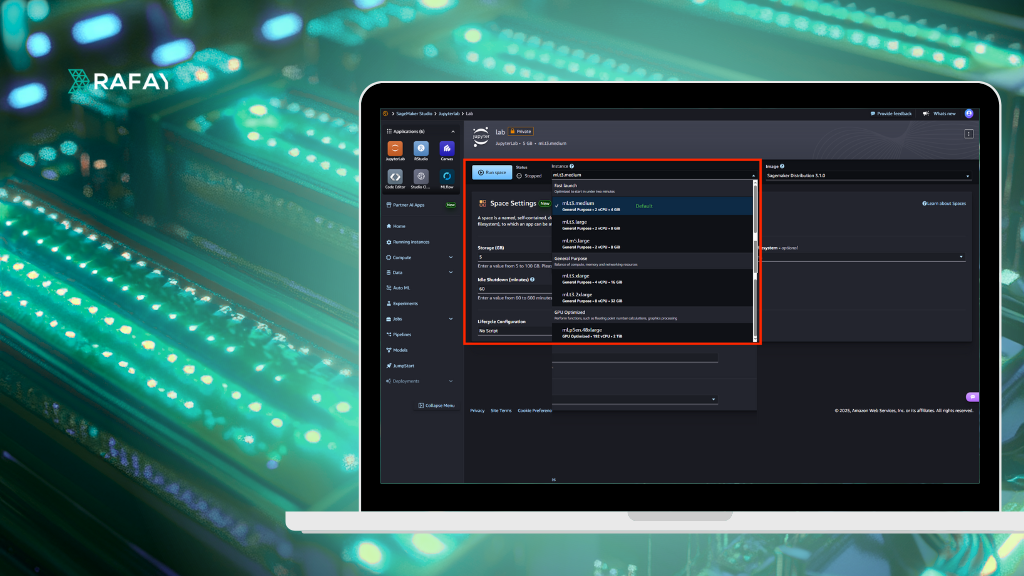
This level of control is essential to making SageMaker sustainable at scale in the enterprise. In the example below, the data scientist is only able to launch from a small list of 6 instance types out a possible list of 100+ instance types supported by SageMaker.

In order to achieve this, the administrator can hide instance types in the user’s profile. See example below for an example.

SageMaker notebook instances are commonly used interactively i.e. data scientists open them when needed and often forget to shut them down. Unfortunately, SageMaker bills for the instance continuously, even when it is idle and not running any code.
Studies show that idle instances are one of the largest sources of wasted cloud ML spend. A single forgotten ml.g4dn.xlarge instance left running over a weekend can cost ~$50—multiply that by hundreds of users and the cumulative waste can be enormous.
By automatically detecting and shutting down idle instances after, say, 60 minutes of inactivity, enterprises can:
An automatic idle shutdown policy delivers savings immediately with no user friction.
In the example below, the administrator has set an idle time of 60 minutes for the user’s profile. This means that Sagemaker Notebooks that are idle for more than 60 minutes will be automatically shutdown.

Amazon SageMaker AI is a powerful solution for enterprise AI/ML. But, without strong administrative controls, it can easily become a source of uncontrolled cloud spend. By enforcing:
Enterprises can achieve significant cost savings, improve accountability, and promote responsible cloud resource usage. These controls transform SageMaker from a “wild west” of variable spend into a manageable, predictable part of the AI/ML platform stack. Implementing these controls ensures that SageMaker delivers maximum value without financial waste.
In the next blog, we will see how organizations implement this for Amazon SageMaker AI automatically using Rafay GPU PaaS while at the same time providing end users with a self service experience for access to SageMaker AI.
Overprovisioned pods silently drain your budget. Here’s how to right-size resources and ensure you only pay for what your workloads actually use.
Read Now