Kubernetes Cluster Backup & Restore with Velero and Rafay
December 24, 2020
No items found.
Kubernetes cluster backup and restore is one of the top priorities for DevOps teams and KubeMasters running containerized applications in production. Without this critical capability, organizations run the risk of a disruption of service and unplanned downtime. The Rafay Kubernetes Management Cloud provides the means for administrators to configure and perform backups for their clusters quickly using popular solutions such as Velero and several others. In this blog, I will describe how administrators can use Velero and Rafay to backup and restore Kubernetes cluster resources.
What is Velero?
Velero is a popular open source tool that can be used to backup and restore Kubernetes cluster resources and persistent volumes. Velero can be used for:
Disaster Recovery
Data Migration
Data Protection
Velero utilizes custom resource definitions (CRDs) to backup and restore the Kubernetes cluster resources. Velero uses Amazon S3 API-compatible object storage as its backup target providing users with a plethora of storage options that provide Amazon S3 compatible APIs. Organizations that wish to standardize on using Velero for backup and restore operations can also use Rafay’s cluster blueprinting capability to ensure Velero is employed for all or a subset of clusters. Cluster blueprints enable DevOps teams to install, manage, and enforce the use of a baseline set of software addons across a fleet of Kubernetes clusters to ensure consistency and achieve compliance.
Installing & Configuring Velero using Rafay
For this exercise, we will use an AWS S3 bucket as the target for Kubernetes cluster backup. Alternatively, we can also use MinIO as the target since it provides compatibility with AWS S3 APIs.
Configuring S3 Bucket for Cluster Data Backup
Velero can be used to backup both Kubernetes objects and persistent volumes. In this example, we will configure it to backup and restore Kubernetes objects.
Step 1: Create AWS S3 bucket
AWS S3 bucket name to use for cluster backup: k8s-data-backupAWS Region: us-east-1
Step 2: Configure IAM policy to allow access to the S3 bucket
Create an AWS credential for an AWS IAM user which has the permissions for the cluster backup S3 bucket as per the IAM policy below.IAM Policy for the S3 credentials:{ "Version": "2012-10-17", "Statement": [ { "Effect": "Allow", "Action": [ "s3:GetObject", "s3:DeleteObject", "s3:PutObject", "s3:AbortMultipartUpload", "s3:ListMultipartUploadParts" ], "Resource": [ "arn:aws:s3:::k8s-data-backup/*" ] }, { "Effect": "Allow", "Action": [ "s3:ListBucket" ], "Resource": [ "arn:aws:s3:::k8s-data-backup" ] } ] }
Step 3: Create AWS Credentials
Create an AWS access key ID and access key secret for the above IAM user. This will be used for programmatic access to AWS to ensure data can be written and read from the specified s3 bucket.
Velero Cluster Backup Configuration
We want Velero’s resources to be deployed to a dedicated namespace on a target cluster. Below are the steps to deploy Velero to the target cluster:
Step 1: Create Velero namespace
Create “velero” namespace in Rafay. This will allow the Rafay controller to dynamically create this namespace when a cluster blueprint is deployed to a target cluster.
Step 2: Create an addon for cloud credential secret to access backup storage location
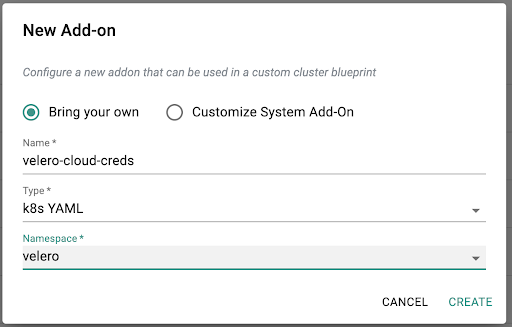
Create a S3 cloud credential secret using below YAML template:apiVersion: v1 kind: Secret metadata: name: velero-aws-creds namespace: velero type: Opaque data: cloud: |- <base64 encoding of the cloud credential file> The cloud credential file format is as follows:[default] aws_access_key_id: "your_aws_s3_access_key" aws_secret_access_key: "your_aws_s3_secret_access_key"Create an addon for this cloud credential as Kubernetes YAML type in “velero” namespace using the above secret YAML file:
Step 3: Create an addon service for Velero controller
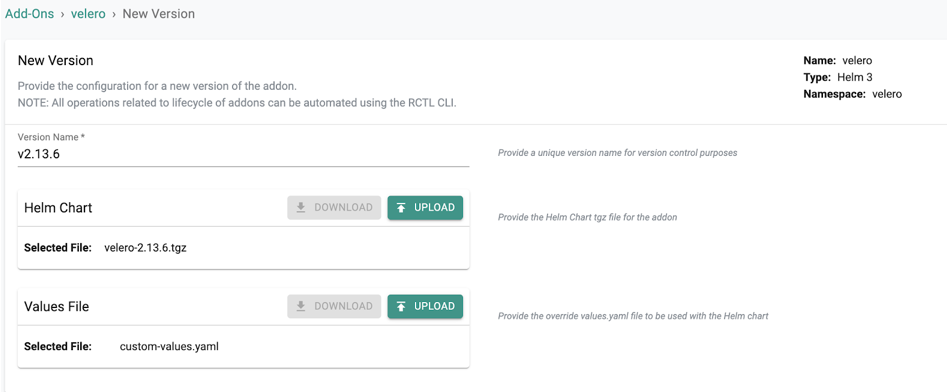
b) Create a custom-values.yaml file and include the following custom values to deploy the Velero controller. In this example, we have configured a backup schedule which will automatically execute every four hours and backup all Kubernetes objects to the specified S3 bucket. With Velero, it is also possible to exclude the objects that need to be backed up. ## ## Configuration settings that directly affect the Velero deployment YAML. ##
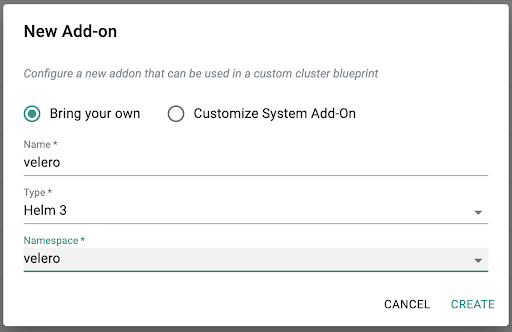
## Enable initContainers for velero-plugin-for-aws # Init containers to add to the Velero deployment's pod spec. At least one plugin provider image is required. initContainers: - name: velero-plugin-for-aws image: velero/velero-plugin-for-aws:v1.1.0 imagePullPolicy: IfNotPresent volumeMounts: - mountPath: /target name: plugins ## ## Parameters for the `default` BackupStorageLocation and VolumeSnapshotLocation, ## and additional server settings. ## configuration: provider: aws backupStorageLocation: name: aws bucket: k8s-data-backup config: region: us-east-1 volumeSnapshotLocation: name: aws config: region: us-east-1 extraEnvVars: AWS_SHARED_CREDENTIALS_FILE: /credentials/cloud ## # Information about the Kubernetes service account Velero uses. serviceAccount: server: create: true name: velero ## # Info about the secret to be used by the Velero deployment, which # should contain credentials for the cloud provider IAM account you've # set up for Velero. credentials: useSecret: true existingSecret: velero-aws-creds ## # Whether to deploy the restic daemonset for backup pvc's deployRestic: false ## ## Schedule to backup cluster data every 4 hours schedules: infra-cluster-backup: schedule: "0 */4 * * *" template: ttl: "240h" includeClusterResources: true ## ## Exclude objects from below namespaces when doing the backup excludedNamespaces: - kube-system - rafay-infra - rafay-system - velero defaultVolumesToRestic: false storageLocation: aws volumeSnapshotLocations: - aws c) Create a Helm 3 addon using the above helm chart and custom values for Velero controller:
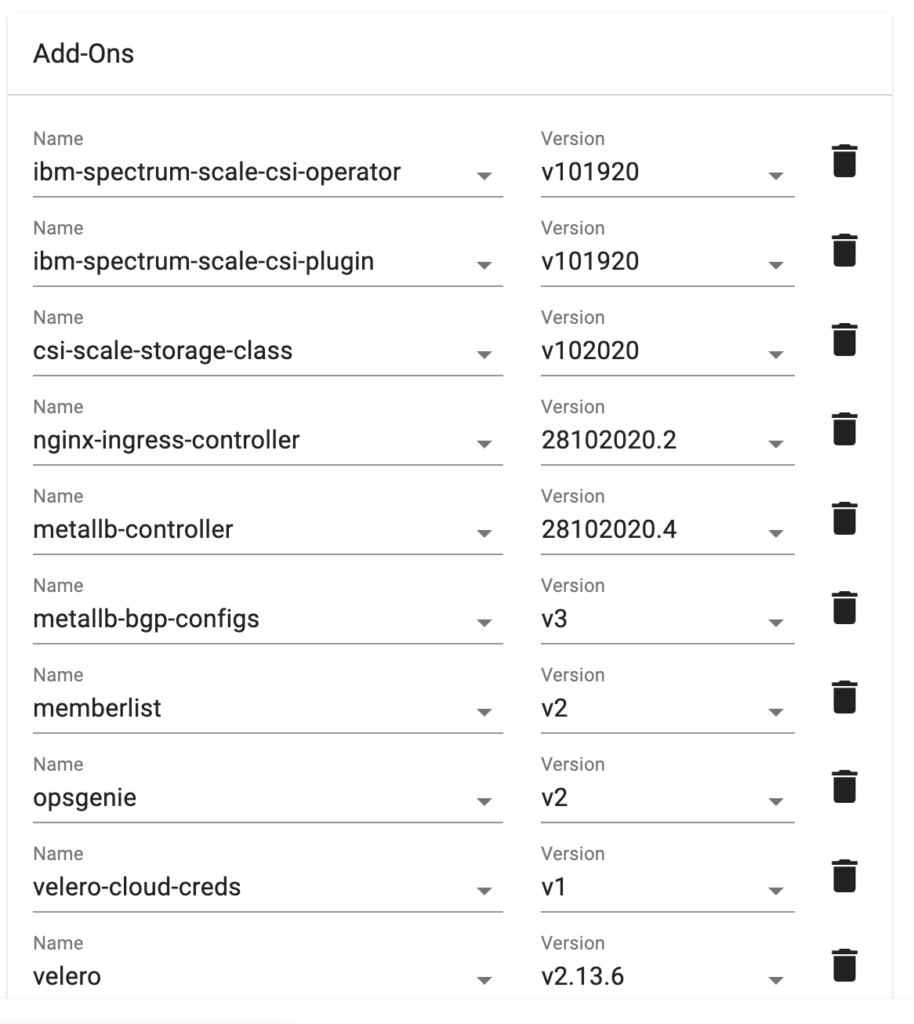
d) Add the Velero addon services created above to the cluster’s custom blueprint along with other cluster add-on services:
As you can see from the above example, in one simple operation, this custom cluster blueprint allows the administrator to deploy a large number of cluster-wide services such as (but not limited to):
IBM Spectrum Scale Container Storage Interface (CSI) for persistent volumes (PV)
Custom blueprints enable seamless repeatability and reproducibility. DevOps teams can also perform this operation in a fully automated manner with version-controlled manifests stored in their Git repositories. e. Deploy the custom blueprint to the clusterf. Verify cluster backup:
Go to S3 bucket and make sure that the backup object data are created
Run kubectl get backup -n velero to verify backup is created as scheduled
Run kubectl describe backup <backup_name> -n velero to check the backup snapshot status
Restoring The Cluster From Backup
In case of a Disaster Recovery (DR) or cluster migration, the Kubernetes cluster objects can be restored using the cluster backup snapshot. Create a k8s-restore.yaml file with the content below to restore the Kubernetes cluster from the desired <backup_name> and deploy it to the cluster:apiVersion: velero.io/v1 kind: Restore metadata: name: k8s-restore namespace: velero spec: backupName: <backup_name> Below is the process to restore the Kubernetes cluster data:
Obtain the backup snapshot information from kubectl get backup -n velero
Identify which backup snapshot to restore the cluster data from by name and check to make sure that the backup snapshot was completed successfully from kubectl describe backup <backup_name> -n velero
Deploy the above restore manifest to the cluster kubectl apply -f k8s-restore.yaml -n velero
Kubernetes Cluster Backup, Restore and Disaster Recovery Made Easy with Velero and Rafay
Kubernetes cluster backup and recovery is critical for business continuity and avoiding extended applications/cluster downtime. Rafay offers flexibility for DevOps teams to natively backup and restore clusters to the Rafay Kubernetes Management Cloud or integrate with separately managed Amazon S3-compatible backup solutions such as Velero in a seamless manner. In addition to supporting standalone Kubernetes cluster backup and restore solutions like Velero, Rafay Kubernetes Management Cloud also provides a fully integrated and turnkey backup solution for organizations. This enables organizations to avoid the learning curve associated with Velero and allows admins to configure and perform backups for their clusters and workloads in just a few minutes. In an upcoming blog, we will describe how this dramatically changes the user experience for administrators and reduces the ongoing operational burden. For more information check out these links:
What is AWS S3 - Amazon Web Services Simple Storage Service?
How Rafay and NVIDIA Help Neoclouds Monetize Accelerated Computing with Token Factories
Learn how Rafay and NVIDIA enable NeoClouds to monetize accelerated computing using Token Factories—turning GPU infrastructure into scalable, token-based AI services.
NVIDIA AICR Generates It. Rafay Runs It. Your GPU Clusters, Finally Under Control
NVIDIA AI Cluster Runtime (AICR) simplifies AI infrastructure deployment. Learn how Rafay operationalizes GPU clusters with governance, self-service access, and platform automation.