As organizations scale their cloud infrastructure, managing dozens or even hundreds of environments becomes increasingly complex. Whether you are rolling out security patches, updating configuration variables, or deploying new template versions, performing these operations manually on each environment is time-consuming, error-prone, and simply unsustainable.
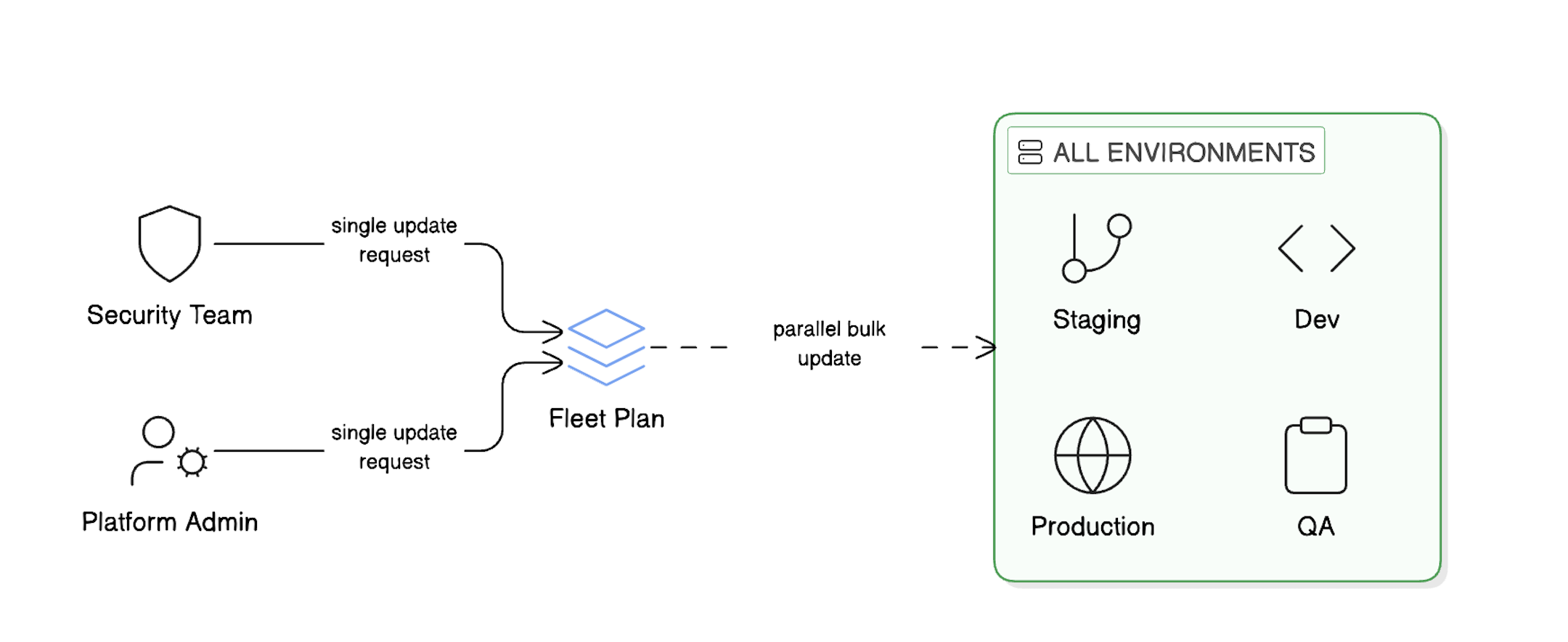
Fleet Plans solve this challenge—a powerful feature that eliminates the need to manage environments individually by enabling bulk operations across multiple environments in parallel.
Fleet Plans provide a streamlined workflow for managing multiple environments at scale, enabling bulk operations with precision and control.
Note: Fleet Plans currently support day 2 operations only, focusing on managing and updating existing environments rather than initial provisioning.
The Challenge of Environment Sprawl
Modern development teams often maintain numerous environments across different stages of the software lifecycle: development, staging, QA, production, and more. Each project might have its own set of environments, each potentially based on different templates and configurations.
Consider a common scenario: Your security team mandates an urgent update to a configuration variable across all production environments. Without fleet management capabilities, an operator would need to:
Identify all affected environments
Navigate to each environment individually
Apply the change manually
Verify the update was successful
Repeat for every single environment
This approach doesn't scale. It's slow, inconsistent, and leaves room for human error.
How Fleet Plans Solve This Problem
Fleet Plans provide an automated approach to managing environment operations at scale. Instead of touching each environment individually, you define:
What operations to perform
Where to apply them (using filters)
When to execute (using schedules)
The system then orchestrates the entire process, executing operations in controlled batches while providing full visibility into progress and status.
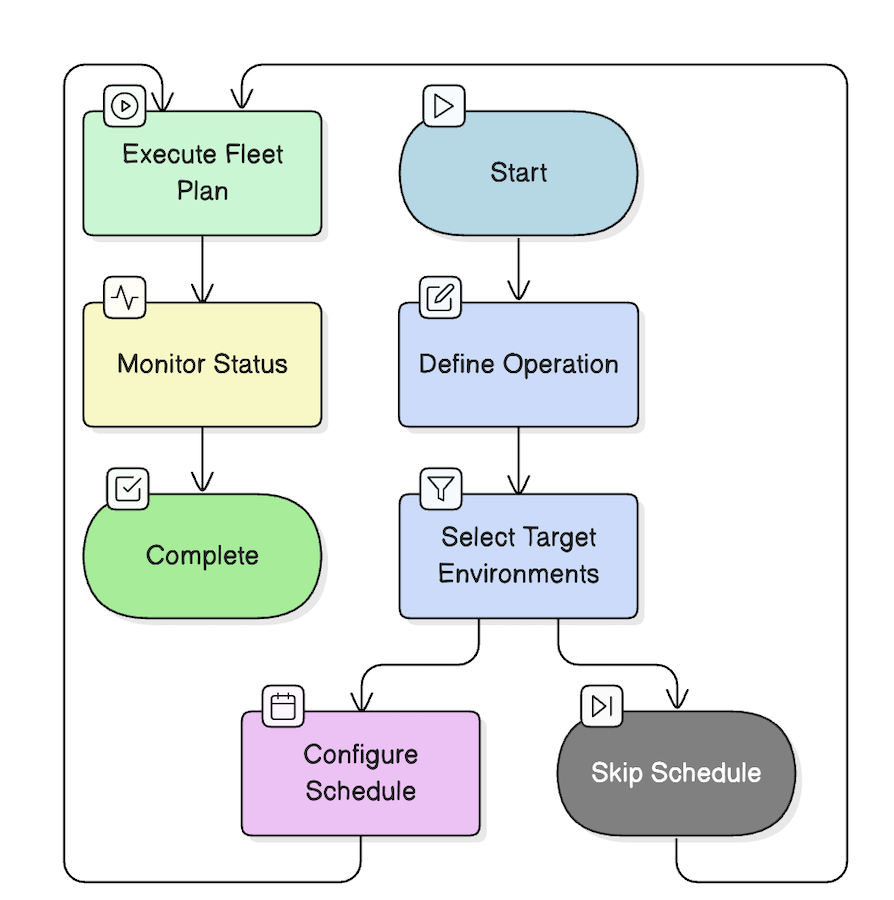
The Fleet Plan configuration flow guides you through defining operations, selecting target environments, optionally scheduling execution, and monitoring the results. This visual workflow ensures a systematic approach to managing environments at scale.
Key Capabilities
1. Flexible Operation Workflows
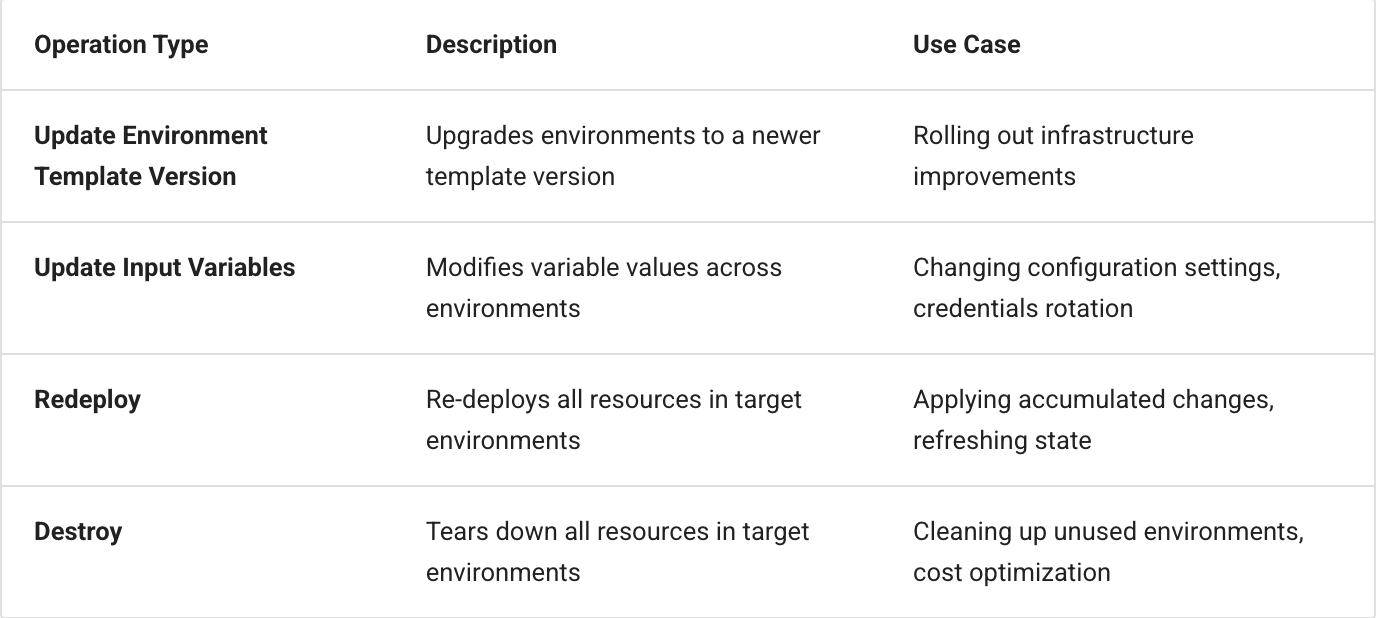
Fleet Plans support multiple operation types that cover the most common environment management tasks:
Each operation can be configured with a "Continue on Failure" option, allowing the workflow to proceed even if individual environments encounter issues.
2. Precise Environment Targeting
Not every operation should apply to every environment. Fleet Plans use a multi level filtering system:
Projects: Select one or more projects to scope the operation
Labels: Apply label-based filters to narrow down to specific environment groups (e.g., env:production, team:platform)
Templates: Optionally filter by specific template and version
This filtering approach ensures you're targeting exactly the right environments—no more, no less.
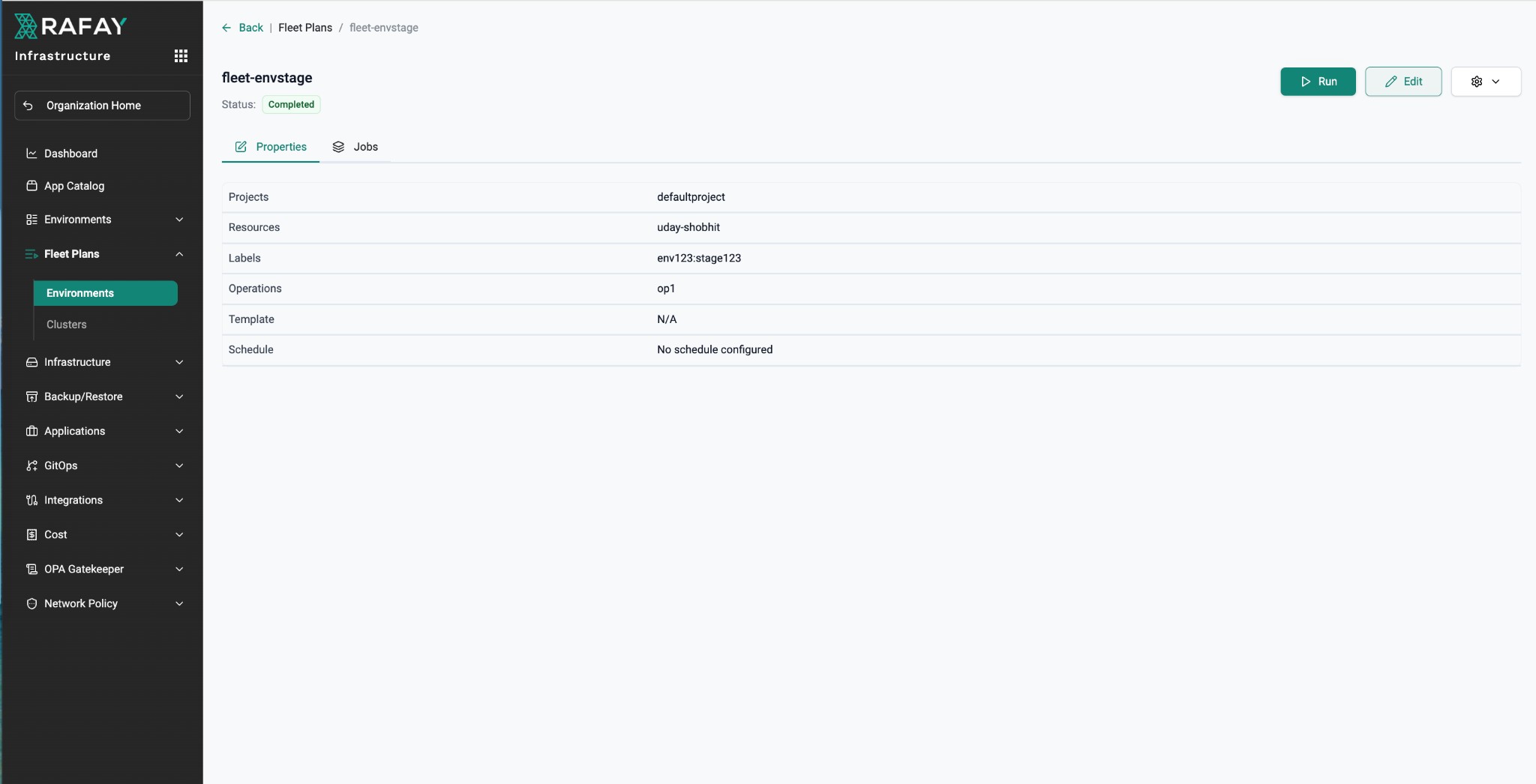
After configuration, the Fleet Plan properties view displays all settings including projects, resources, labels, and operations. This example shows a completed fleet plan with its targeting criteria clearly defined.
3. Scheduled Execution
Fleet Plans support both one-time and recurring schedules:
One-Time: Execute the plan at a specific time, with optional Time-to-Live (TTL) settings
Recurring: Use cron expressions for regular execution (e.g., weekly maintenance windows)
Scheduling is particularly valuable for operations that need to occur during low traffic periods or as part of regular maintenance routines.
4. Comprehensive Job Monitoring
Once a Fleet Plan runs, you get full visibility into execution status:
Success: Environment completed the operation successfully
Failed: Something went wrong—investigate and remediate
Pending: Queued and waiting to start
In Progress: Currently executing
Skipped: Bypassed due to workflow logic
Cancelled: Manually stopped
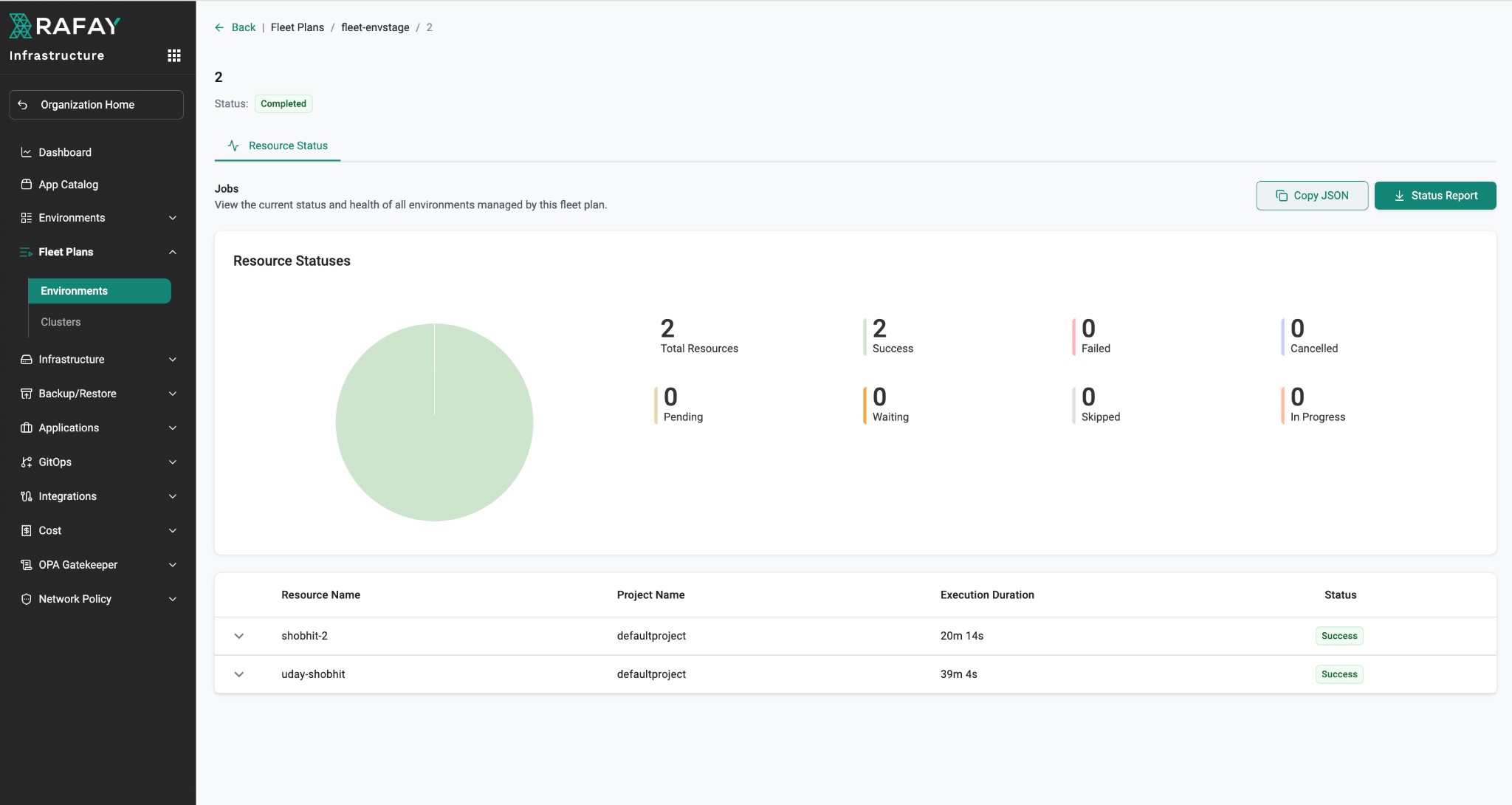
Visual dashboards with pie charts and counters make it easy to assess the overall health of a fleet job at a glance.
The job status dashboard provides comprehensive visibility into fleet plan execution, showing success rates, resource-level details, and execution duration for each managed environment.
Real-World Use Cases
Use Case 1: Rolling Template Updates
Your platform team has released a new version of the base infrastructure template that includes security patches and performance improvements. With Fleet Plans:
Create a fleet plan targeting all environments using the old template version
Configure an "Update Environment Template Version" operation
Set a schedule for the maintenance window
Monitor the rollout and address any failures
Use Case 2: Configuration Drift Remediation
You have discovered that a critical configuration variable has inconsistent values across your production environments. With Fleet Plans:
Filter environments by project and required environment label
Add an "Update Input Variables" operation with the correct value
Execute immediately or schedule for off hours
Verify all environments now have consistent configuration
Use Case 3: Cost Optimization Cleanup
End of quarter is approaching and finance wants to reduce cloud spend by eliminating unused development environments. With Fleet Plans:
Filter by project and required labels
Configure a "Destroy" operation
Review the target environment list carefully
Execute to clean up resources and reduce costs
Getting Started
Ready to simplify your environment management? Here's how to create your first Fleet Plan:
Navigate to Fleet Plans → Environments in the left navigation
Click New Fleet Plan
In the dialog box provide a name and then click Create
Configure your operation workflow (what operations to perform)
Set up environment filters to target the right environments (projects, labels, templates)
Optionally configure a schedule for execution
Save, review, and run your fleet plan
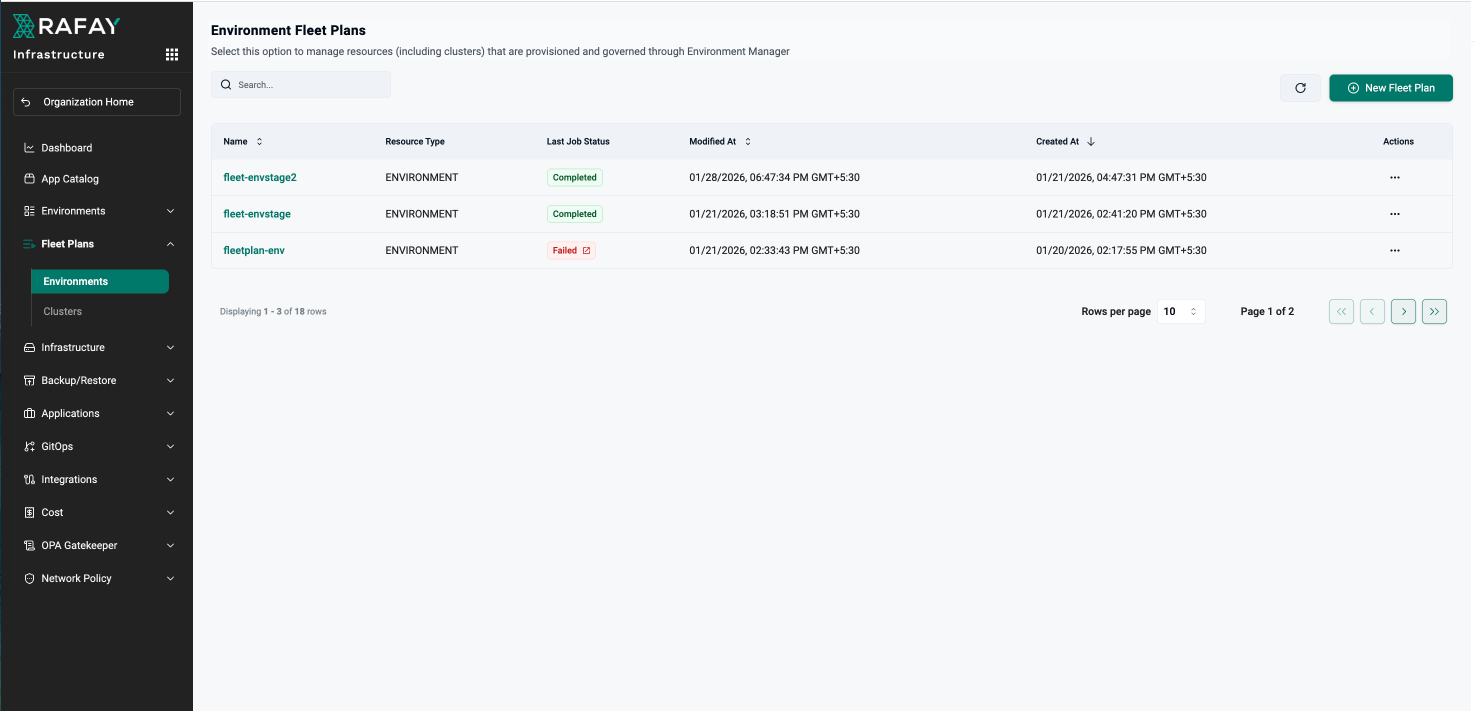
The Environment Fleet Plans dashboard provides a centralized view of all your fleet plans, showing their status, last job execution results, and key metadata. From here, you can create new plans, monitor existing ones, and manage your fleet operations.
Fleet Plans transform environment management from a manual, error-prone process into an automated, scalable operation. By combining flexible targeting, powerful operations, and comprehensive monitoring, Fleet Plans give platform teams the tools they need to manage environments at any scale.
Whether you're updating ten environments or ten thousand, Fleet Plans ensure consistency, visibility, and control—freeing your team to focus on innovation rather than repetitive operational tasks.
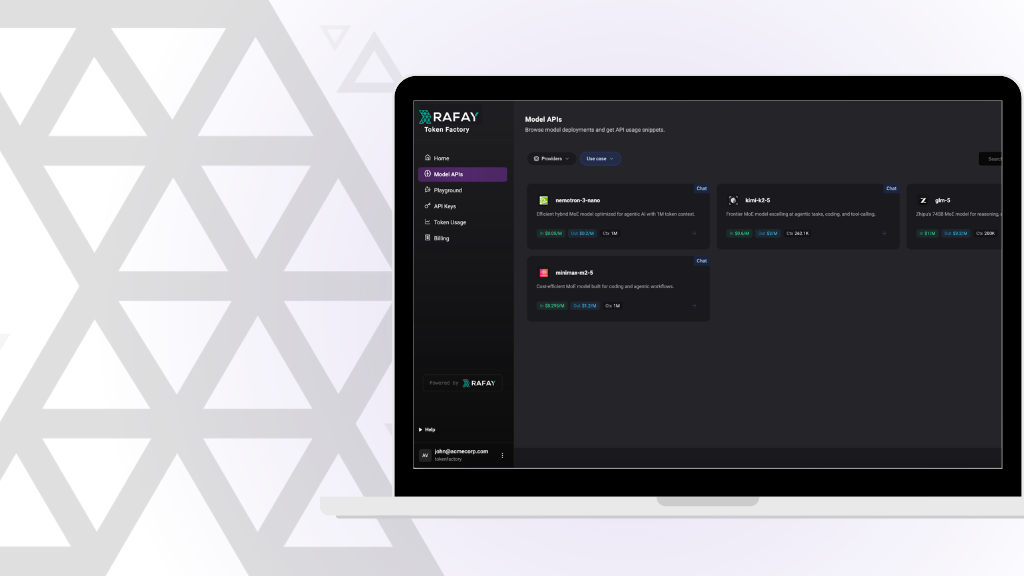
How Rafay and NVIDIA Help Neoclouds Monetize Accelerated Computing with Token Factories
Learn how Rafay and NVIDIA enable NeoClouds to monetize accelerated computing using Token Factories—turning GPU infrastructure into scalable, token-based AI services.
Enterprises often require explicit approvals before critical actions can proceed especially when provisioning infrastructure or making configuration changes.



.png)