The declarative model of Kubernetes uses Kubernetes Objects stored in configuration files which are essentially a set of YAML files. For every version and instance of a Kubernetes application that DevOps personnel deploy and run in their environments, a set of YAML files need to be created and managed. Even the simplest of the applications have a few dependencies that need to be instantiated using YAML files. As the number of applications and clusters grow, managing and versioning these YAML files on a per-application basis can become quite complicated to manage.One of our customers has deployed a three-tier web application consisting of PostgreSQL database, Django backend, UI and NGINX as frontend along with a messaging service like Kafka and Redis for caching. For each deployment of this application in Kubernetes, it takes 20 YAML files. The customer has 3 development, 1 QA, 1 staging, 1 pre-production, and 1 production environments. In all, the DevOps team had to manage a total 140 YAML files. However, by using Helm charts, the DevOps team is able to reduce this to just 20 templates and one simple additional environment-specific file!In this post, we will introduce Helm charts, how they are typically used, and discuss how Helm Charts can simplify the life of DevOps teams.
What is Helm?
Helm is a package manager for Kubernetes. It is the apt, yum, or homebrew equivalent for Kubernetes. The fundamental unit of Helm is a Helm chart. A set of Helm charts together form a packaged application that can be deployed as one unit. Helm serves two main functions:
Package Manager: Helm works as a package manager with in-built version and dependencies management.
Templating Engine: By creating application templates using Helm charts, DevOps personnel can deploy the same application across different Kubernetes clusters such as development, staging, and production with the same set of Kubernetes YAML files.
How Can Helm Simplify the Life of DevOps?
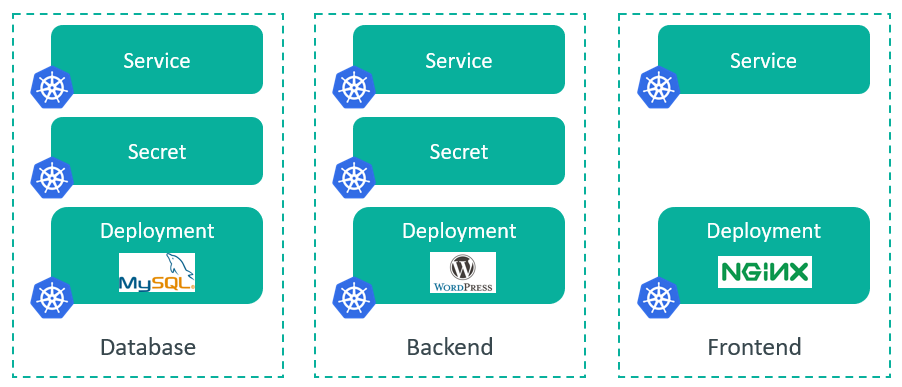
Setting up and deploying a Kubernetes application involves creating multiple Kubernetes resources such as secrets, config maps, services, deployments, etc. Each of these resources requires a YAML file with hard-coded values. For example, if we want to just deploy an instance of MySQL database, it requires 3 resources to be created in Kubernetes: Service, Secrets & Deployment.Now, consider the case of a web application to be deployed in Kubernetes. It will require several resources to be created as shown below. Now, this is just one instance of the application with eight YAML files with specific hard-coded values. If the same application has to be deployed in another cluster, location, or cloud - it will require another set of eight YAML files with a few modifications. But, the majority of the content in the YAML files remain the same. Over time, if these application instances were upgraded then the number of YAML files will double. Do you catch the drift?
Helm charts simplify the process of creating and deploying an application by combining the YAML files into a single package that can be advertised to a Kubernetes cluster. From there on, installing an application is as simple as executing the helm install command.To understand how Helm can simplify the deployment of an application, let’s take a look at the components of a Helm chart first. A new Helm chart can be created by executing the command helm create <chart-name>. This creates a directory structure as shown below:# ls -a my-chart/ . .. .helmignore Chart.yaml charts templates values.yaml #
.helmignore: file is used to specify files you don't want to include in your Helm chart. It is similar to .dockerignore and .gitignore. By specifying files to be ignored in .helmignore, you can avoid including unnecessary or sensitive files and directories from being added to your Helm chart.
Chart.yaml: contains all the metadata about the application such as the name, tag or version number, etc.
Values.yaml: contains the values that need to be used for the parameterized variables in the template for a specific deployment
Charts Directory: is used to store any charts that we want to reuse for this deployment. Think about this as a place to store dependencies.
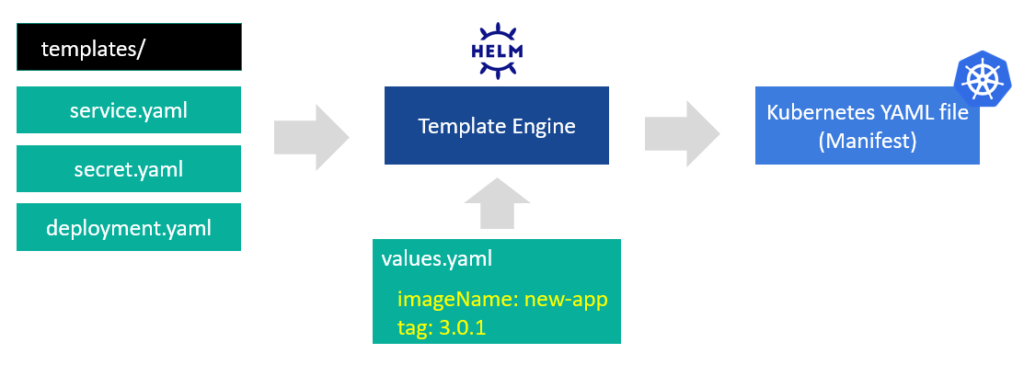
Templates Directory: contains all the Kubernetes YAML files required to deploy an application. For the MySQL example above, the Templates directory will contain the deployment.yaml, secret.yaml and service.yaml files. The templatized fields in these files will get their actual values injected from the values.yaml file.
Now, let's take a look at how all these work together. For the MySQL example, the Templates directory will contain the deployment.yaml, secret.yaml and service.yaml files. However, the container image name and tag (version) fields are configured as variables. The actual container image name and tag values are stored in the values.yaml file. When you execute the command helm install <app-name><chart-name>, the Helm Template Engine picks up the Kubernetes YAML files from the Templates directory, injects the values configured for the variables in the values.yaml file to produce a single comprehensive Kubernetes YAML file, also known as the manifest file.
Going back to the web application example, by using Helm, we can maintain the number of Kubernetes YAML files stored in the Templates directory to be a constant at eight and create environment-specific short values.yaml file. This reduces the significant number of YAML files to be maintained and managed over time. With this design and architecture, Helm offers significant benefits to developers and DevOps personnel as follows:
Standardization and Reusability: Build once and use the same Helm chart for different environments by simply making minor tweaks to the values.yaml file. A Helm chart built by one team can be reused by other teams without reinventing the wheel. Helm charts are readily available on the Artifact HUB, the official Helm charts repository, from many of the popular application vendors.
Improve Productivity: By abstracting the complexities of Kubernetes YAML files, developers and DevOps teams are unburdened from developing specific knowledge about Kubernetes objects and enabled to do what they do best -- code or operate.
Simplified Kubernetes Adoption: By leveraging pre-built Helm charts, organizations can readily deploy applications to the environments of their choice without a big Kubernetes learning curve.
Working with Helm
Now that you have learned the fundamentals of Helm, let's take a look at some of the useful Helm commands, tips, and tricks:
helm install <app-name> <chart-name> installs the application. However, you can use helm install --generate-name <chart-name> for the system to auto-generate a name for the application. This is useful when you are deploying several application instances to scale out in an automated environment. But, with randomly generated names, you may lose track of the application instances.
Use Helm search <keyword> to search within helm charts.
helm install --values=custom-values.yaml <chart-name> overrides the default values.yaml file and takes the inputs from the custom-values.yaml file for this install.
helm install --set version=<x.y.z> <chart-name> overrides the version number configured in the values.yaml file and uses <x.y.z> for this install. Similarly, you can pass custom values for specific fields using the --set option. This is useful while testing applications with minor modifications to the standard package.
helm lint ./<chart-name>/ checks for any syntax errors in the Helm chart without going through the install process.
helm install --dry-run --debug ./<chart-name>/ is used to generate the Kubernetes YAML file and validate if the values are injected correctly without going through the install process.
For use cases where you would like to, for example, authenticate a user before s/he deploys the application, you can make use of Helm Chart Hooks. Check out this comprehensive Helm Chart Hooks tutorial.
helm upgrade is used to upgrade a release to a new version of a chart.
helm rollback rolls back a release to a previous revision. Suppose you upgraded to a new release and found any compatibility issues, helm rollback comes in very handy to seamlessly roll back to the previous release.
helm uninstall removes a specific deployment.
Using Helm Charts with Rafay
DevOps and application teams can use Rafay to dramatically accelerate and streamline the deployment and ongoing operations for their Helm charts. Some of the core benefits provided by Rafay are described below.
GitOps Pipelines
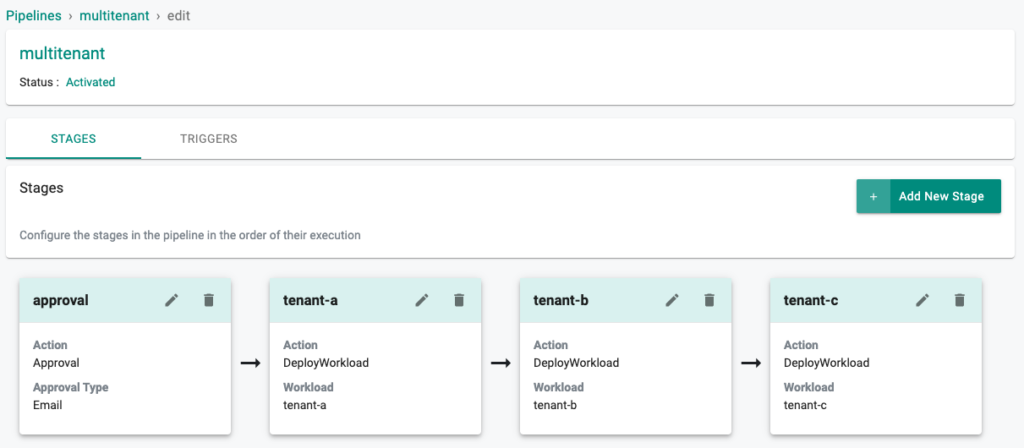
With Rafay, DevOps teams can fully automate the deployment of their Helm chart based workloads by using the integrated, multi-stage, pull-based GitOps pipelines.
Drift Detection and Protection Control Loop
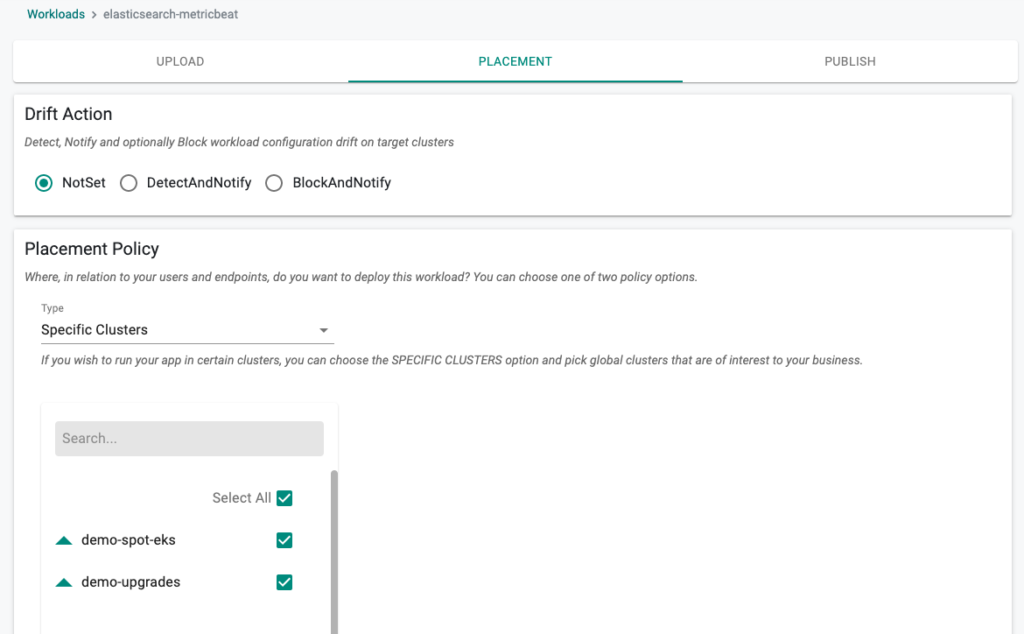
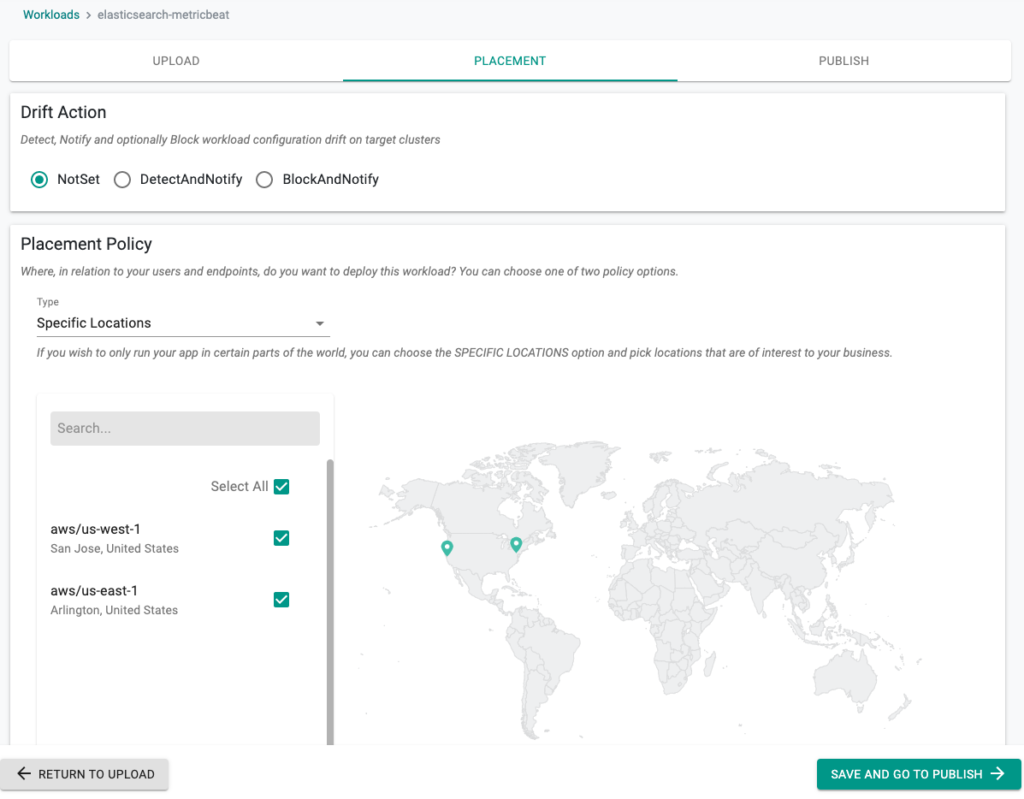
In production environments, customers can leverage Rafay’s drift detection and avoidance capabilities to simplify governance. DevOps team can ensure that no unauthorized or accidental configuration changes are carried out by team members on production infrastructure by easily configuring a drift block. If DevOps teams prefer to have developers make changes in production as needed, drift notification can be configured for tracking purposes. These options can be easily selected via the Rafay UI (shown below) or via the Rafay CLI.
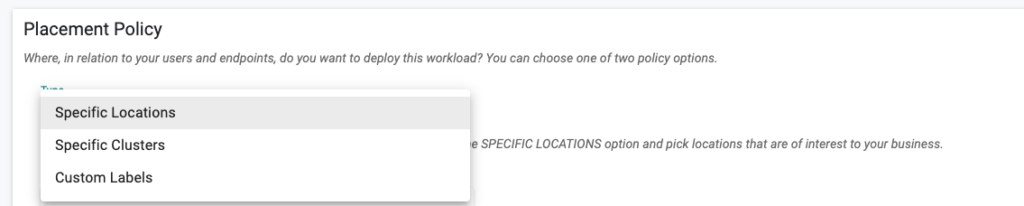
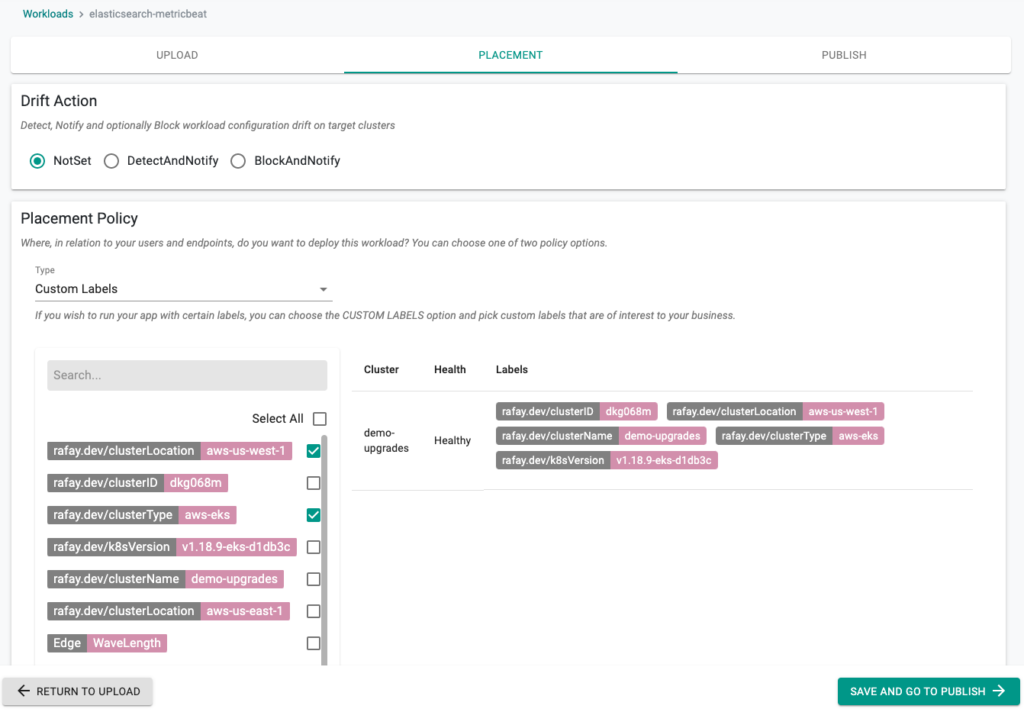
DevOps teams can abstract cluster details (name, identity, etc.) from their deployment pipelines for their Helm chart based workloads by implementing placement policies driven by Location and Cluster Labels.
Companies can deploy Helm chart-based workloads to one or more specific locations by using the Location Based Placement Policy as shown below (and manage drift, see above):
Companies can deploy Helm chart-based workloads to one or more specific clusters by using the Cluster Label Based Placement Policy as shown below:
DevOps Simplified with Helm Charts
Helm charts are a very powerful tool that can help standardize your Kubernetes deployments and avoid reinventing the wheel over and over. Helm charts improve the productivity of DevOps and application teams by abstracting the complexities of Kubernetes YAML files and enable organizations to easily adopt Kubernetes without a big Kubernetes learning curve. Rafay takes it to the next level by deploying and managing Helm chart-based workloads to multiple environments from edge to cloud with Location- and Cluster Label-based placement policies and providing drift controls to maintain the fidelity of Kubernetes clusters.To learn more, check out these Helm resources:
How Rafay and NVIDIA Help Neoclouds Monetize Accelerated Computing with Token Factories
Learn how Rafay and NVIDIA enable NeoClouds to monetize accelerated computing using Token Factories—turning GPU infrastructure into scalable, token-based AI services.
Kubernetes is a rapidly evolving open-source project with periodic releases. And organizations embracing Kubernetes must adopt the practice of regular upgrades.