Cloud providers offering GPU or Neo Cloud services need accurate and automated mechanisms to track resource consumption. Usage data becomes the foundation for billing, showback, or chargeback models that customers expect. The Rafay Platform provides usage metering APIs that can be easily integrated into a provider’s billing system. ‘
In this blog, we’ll walk through how to use these APIs with a sample Python script to generate detailed usage reports.
Prerequisites & Environment
This exercise assumes that you have access to an instance of the Rafay Platform. Also ensure that you have Org Admin level access to the Default Org so that you can use the API Keys to programmatically retrieve the usage metering data.
Set the following environment variables on your system. Ensure you update with the correct values for your environment.
RAFAY_CONSOLE_URL — Base domain for your Rafay Platform (no protocol)
RAFAY_DEFAULT_API_KEY — Org Admin API key for the Default Org used for x-api-key auth
Type “env” in Terminal to verify if the variables were set correctly.
Tip: Cloud Providers can run this script via a nightly cron/Kubernetes CronJob to keep metering data current on their systems.
What the Example Script Produces
The example script will use the APIs to retrieve the data and generate two timestamped CSVs in the working directory:
ncp-metrics-.csv
ncp-metrics-sorted-.csv (sorted for convenient downstream processing)
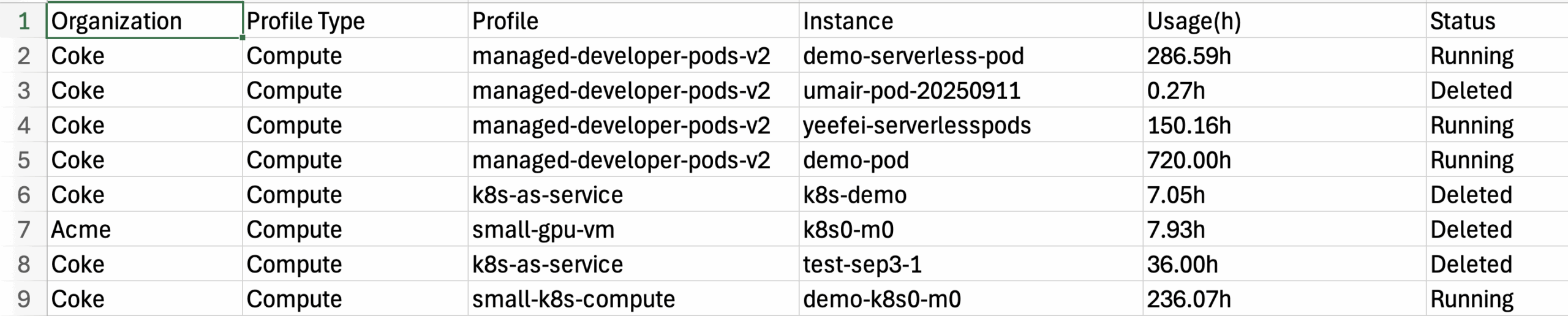
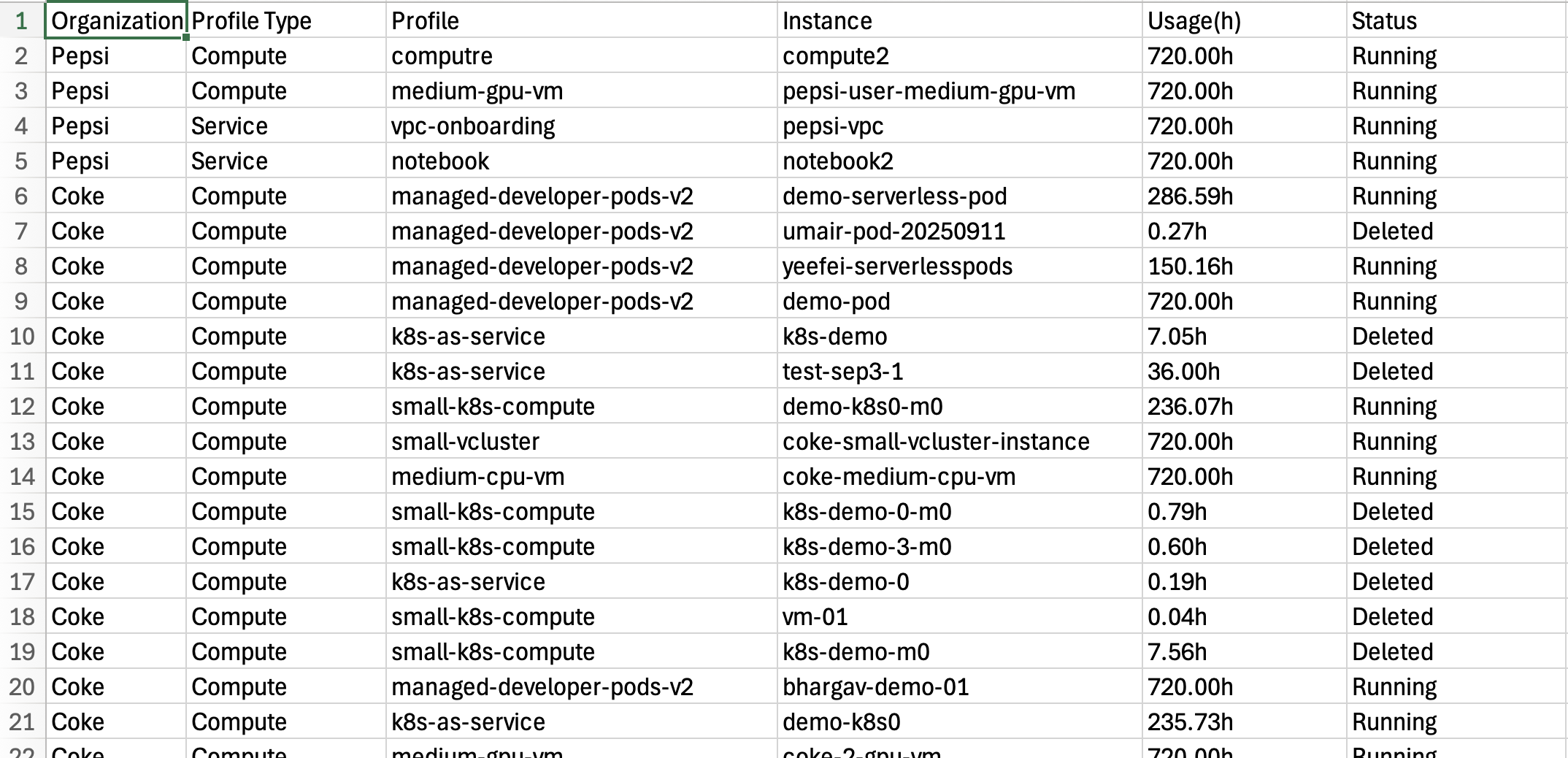
Important: Columns include organization, profile type, profile, instance, usage (hours), and status — ideal for billing ETL and dashboards.
Full Annotated Script
Shown below is working sample code in Python to retrieve the usage/metering data.
"""
ncp_metrics.py — Annotated
Purpose: Retrieve usage metering data from the Rafay Platform for a configurable window
(DAYS env var) and write results to timestamped CSV files for billing.
Environment variables:
- DAYS: Number of days to look back (e.g., 30 days).
- RAFAY_CONSOLE_URL: Your Rafay Platform's base domain (e.g., rafay.acme.com).
- RAFAY_DEFAULT_API_KEY: Default Org's Org Admin API key used for x-api-key auth.
Typical usage:
$ export DAYS=30
$ export RAFAY_CONSOLE_URL=rafay.acme.com
$ export RAFAY_DEFAULT_API_KEY=default_org_api_key
$ python ncp_metrics.py
Notes:
- Output files: ncp-metrics-<timestamp>.csv and a sorted variant,
ncp-metrics-sorted-<timestamp>.csv
- Safe to run as a cron job / Kubernetes CronJob for nightly metering pulls.
"""import csv
import json
import os
import requests
import sys
import time
from datetime import datetime, timedelta, timezone
# --- main(): see description below ---
# Entrypoint: computes time window, calls helper functions, writes CSVs.
# Helper functionusedbymain().
defmain():
timestr = time.strftime("%m%d%Y-%H%M%S")
metrics_row = ["Organization", "ProfileType", "Profile", "Instance", "Usage(h)", "Status"]
filename = "ncp-metrics-" + timestr + ".csv"
filename_sorted = "ncp-metrics-sorted-" + timestr + ".csv"
fd_csv = open(filename, 'w')
csv_writer = csv.writer(fd_csv)
# CheckrequiredenvvarsDAYS = int(os.environ.get('DAYS', None))
RAFAY_CONSOLE_URL = os.environ.get('RAFAY_CONSOLE_URL', None)
RAFAY_DEFAULT_API_KEY = os.environ.get('RAFAY_DEFAULT_API_KEY', None)
ifDAYSisNone:
print("Please set DAYS environment variable for the duration to collect metrics for")
sys.exit(1)
ifRAFAY_CONSOLE_URLisNone:
print("Please set RAFAY_CONSOLE_URL environment variable to your console URL")
sys.exit(1)
ifRAFAY_DEFAULT_API_KEYisNone:
print("Please set RAFAY_DEFAULT_API_KEY environment variable to your default org API key")
sys.exit(1)
# Outputheadercsv_writer.writerow(metrics_row)
# ComputethetimewindowinUTC (now minus DAYS)
current_time_utc = datetime.now(timezone.utc)
past_time_utc = current_time_utc - timedelta(days=int(DAYS))
current_time_str = get_formatted_utc_timestamp(current_time_utc)
past_time_str = get_formatted_utc_timestamp(past_time_utc)
# Fetchorganizations (tenants)
organizations = get_organizations(RAFAY_CONSOLE_URL, RAFAY_DEFAULT_API_KEY)
# Foreachorg, fetchusagedetailsacrossprofiletypes/profiles/instancesfororginorganizations:
org_name = org.get('name', 'Unknown')
profiles = get_profiles(RAFAY_CONSOLE_URL, org['metadata']['name'], RAFAY_DEFAULT_API_KEY)
forprofileinprofiles:
profile_type = profile.get('spec', {}).get('type', 'Unknown')
profile_name = profile.get('metadata', {}).get('name', 'Unknown')
# Fetchinstanceusagewithinthetimewindowinstance_usage = get_profile_instance_usage( RAFAY_CONSOLE_URL,
org['metadata']['name'],
profile_name,
past_time_str,
current_time_str,
RAFAY_DEFAULT_API_KEY
)
# WriteeachrowtoCSVforitemininstance_usage.get("instance_usage_data", []):
row = [
org_name,
profile_type,
profile_name,
item.get('instance_name', ''),
item.get('usage_hours', 0),
item.get('status', '')
]
csv_writer.writerow(row)
fd_csv.close()
# ProduceasortedversionoftheCSVforeasyconsumptionsort_csv(filename, filename_sorted)
# --- get_formatted_utc_timestamp(): seedescriptionbelow ---
# Helperfunctionusedbymain().
defget_formatted_utc_timestamp(dt: datetime) -> str:
# Format: 2023-09-01T12:34:56Zreturndt.strftime("%Y-%m-%dT%H:%M:%SZ")
# --- get_organizations(): seedescriptionbelow ---
# Helperfunctionusedbymain().
defget_organizations(console_url: str, api_key: str):
"""
ReturnsalistoforganizationsaccessibletotheAPIkey.
"""
url = f"https://{console_url}/v2/organizations"
headers = {
"content-type": "application/json",
"x-api-key": api_key,
}
r = requests.get(url, headers=headers, timeout=60)
r.raise_for_status()
data = r.json()
# Expectdatatocontain 'items' withorgmetadatareturndata.get('items', [])
# --- get_profiles(): seedescriptionbelow ---
# Helperfunctionusedbymain().
defget_profiles(console_url: str, org_id: str, api_key: str):
"""
ReturnsalistofNCP (Neo Cloud Platform/GPU) profilesforanorganization.
"""
url = f"https://{console_url}/v2/organizations/{org_id}/ncp/profiles"
headers = {
"content-type": "application/json",
"x-api-key": api_key,
}
r = requests.get(url, headers=headers, timeout=60)
r.raise_for_status()
data = r.json()
return data.get('items', [])
# --- get_profile_instance_usage(): see description below ---
# Helper function used by main().
def get_profile_instance_usage(
console_url: str,
org_id: str,
profile_name: str,
start_time: str,
end_time: str,
api_key: str
):
""" Returns usage details (per instance) between start_time and end_time
for a given org/profile.
"""
url = (
f"https://{console_url}/v2/organizations/{org_id}/ncp/profiles/" f"{profile_name}/usage?start_time={start_time}&end_time={end_time}" )
headers = {
"content-type": "application/json",
"x-api-key": api_key,
}
r = requests.get(url, headers=headers, timeout=90)
r.raise_for_status()
return r.json()
# --- sort_csv(): see description below ---
# Helper functionusedbymain().
defsort_csv(input_file: str, output_file: str):
"""
SortstheinputCSVbyOrganization, ProfileType, Profile, Instance.
Writesthesortedrowstooutput_filewiththesameheader.
"""
try:
withopen(input_file, mode='r', newline='') asinfile:
reader = csv.reader(infile)
header = next(reader, None)
# Definesortkeybasedoncolumnpositionsdefsort_key(row):
return (row[0], row[1], row[2], row[3])
# Readallandsort (skip empty rows)
data = [rowforrowinreaderifrow]
sorted_data = sorted(data, key=sort_key)
withopen(output_file, mode='w', newline='') asoutfile:
writer = csv.writer(outfile)
writer.writerow(header)
writer.writerows(sorted_data)
print(f"Successfully sorted data and saved to '{output_file}'.")
exceptFileNotFoundError:
print(f"Error: The file '{input_file}' was not found.")
exceptExceptionase:
print(f"An unexpected error occurred: {e}")
if__name__ == "__main__":
main()
Running the Script
To run the script, use the following Python command
python3 ncp_metrics.py
You should see something like the following. In the output (results trucated) below, you can see that there are several tenants (Orgs) called Coke, Acme and Pepsi. The script is iterating through the instances of SKUs spanning both Coke and Pepsi tenants, reporting the usage for each instance.
More Than GPU Hours: What It Really Means to Monetize AI Infrastructure
GPU hours capture only a fraction of the value created by modern AI infrastructure. As telcos, governments, banks, healthcare systems, and regional providers build private and sovereign AI clouds, they need commercial models that reflect what customers actually consume and value. Rafay and Solvimon connect infrastructure-level metering with flexible billing to turn GPU capacity into governed, differentiated, and billable AI services.
The AI Infrastructure Race Is Shifting from GPU Capacity to Operational Execution
Rafay CEO Haseeb Budhani joins theCUBE to discuss sovereign AI, multi-tenant cloud platforms, GPU monetization, and the shift from infrastructure to AI services.




.png)