In Part 1, we discussed the core problem: most organizations still deliver GPU access through the wrong abstraction. Developers and data scientists do not want tickets, YAML, and long provisioning cycles. They want a ready-to-use environment with the right amount of compute, available when they need it.
In Part 2, we looked at what that self-service experience feels like for the end user: a familiar, guided workflow that lets them select a profile, launch an environment, and SSH into it in about 30 seconds.
In this part, we shift to the other side of the experience: how platform teams design that experience in the first place. Specifically, we will look at how teams can configure and customize a Developer Pod SKU using the integrated SKU Studio in the Rafay Platform.
Why SKU Design Matters
A great self-service experience does not happen by accident. The reason Developer Pods feel simple for users is because platform teams have already done the hard work of turning raw infrastructure into a clean, curated product.
That is the real value of Rafay's SKU Studio.
Instead of exposing low-level Kubernetes concepts, dozens of infrastructure choices, or inconsistent images, platform teams can publish opinionated SKUs that map directly to what users actually want:
“Give me a ready-to-use development environment with the right amount of compute.”
This means users get speed and simplicity, while platform teams keep standardization, governance, and efficient GPU utilization.
Developer Pod SKU Design
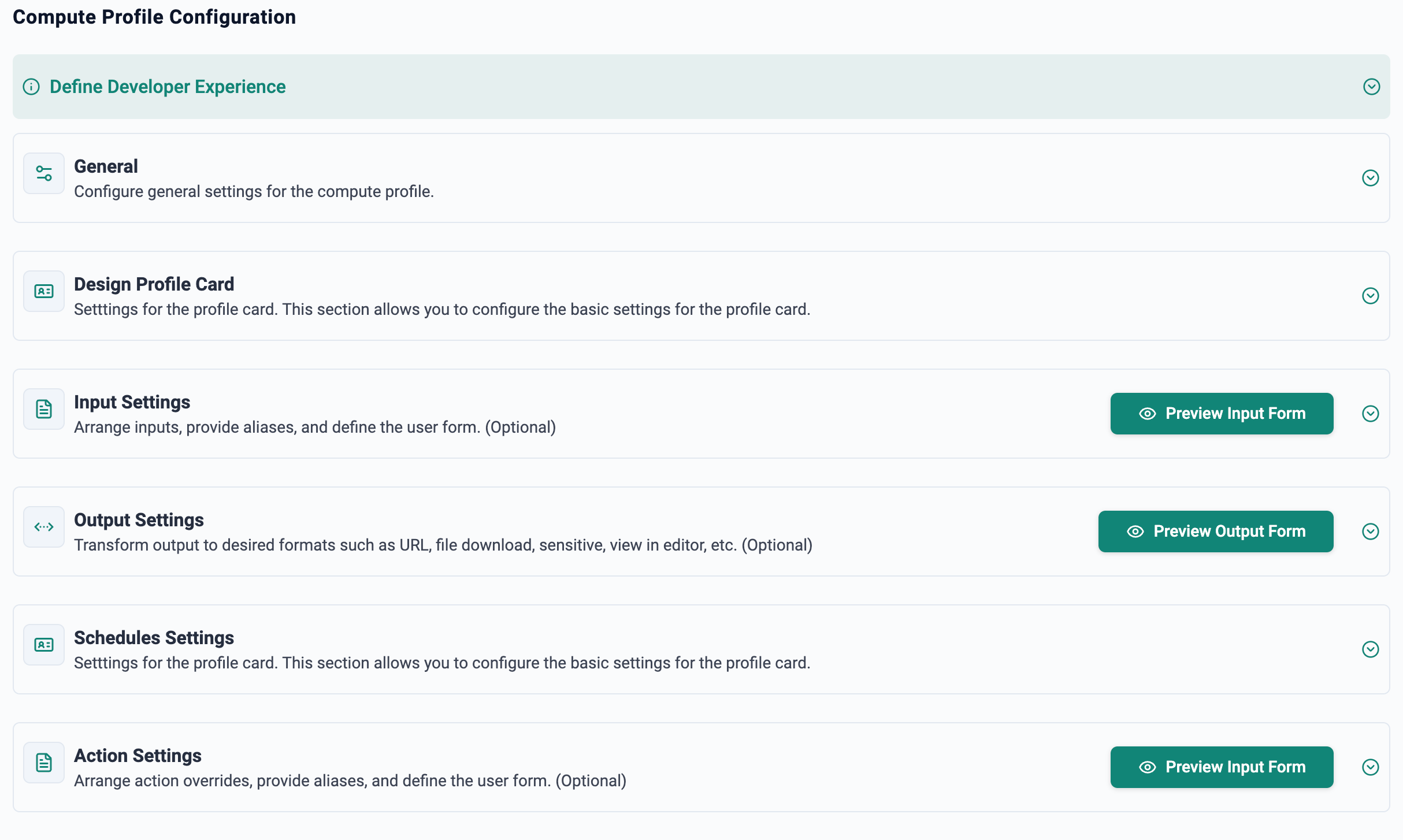
As shown in the image above, the SKU designer includes several sections such as general settings, design, inputs, outputs, actions, and schedules. For this example, we will focus on the sections that shape the end-user experience most directly: how the SKU looks, what choices are exposed, and what information the user sees after deployment.
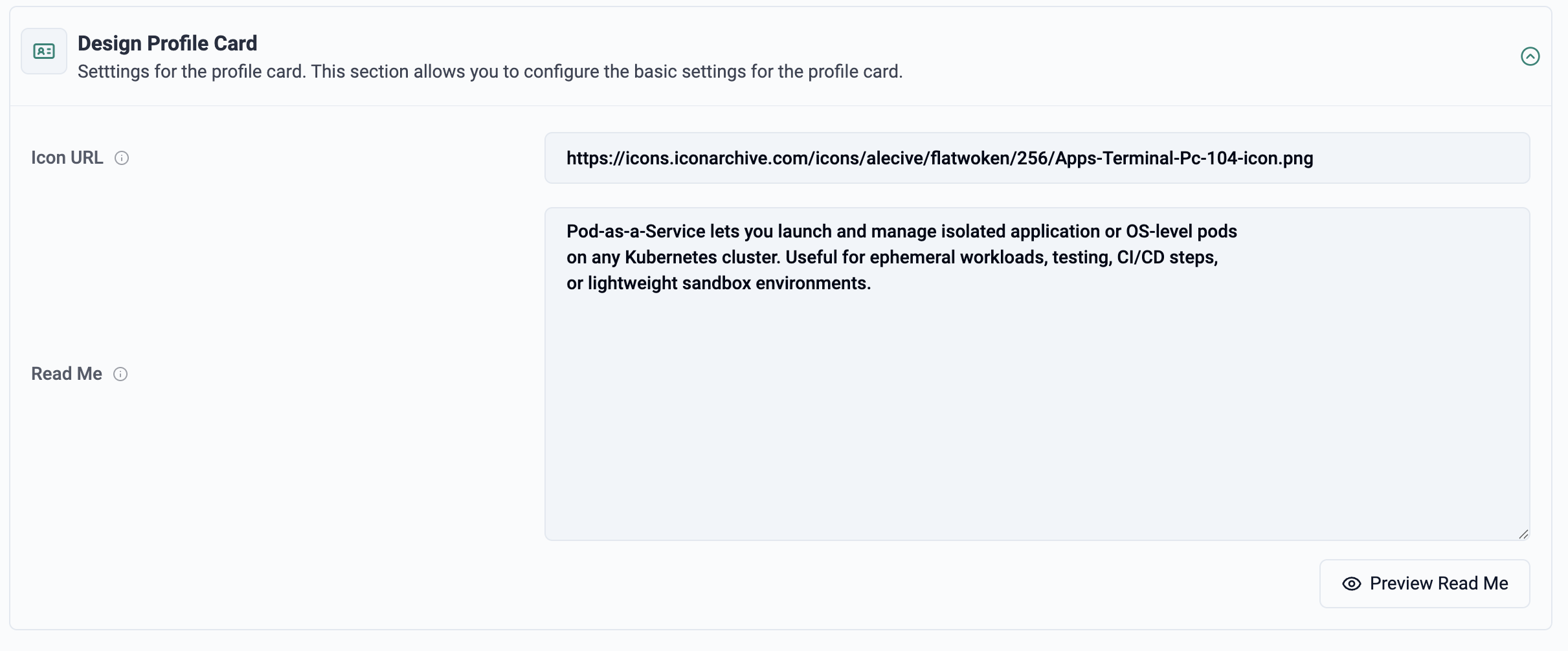
Description
This section allows the platform engineer to control how the SKU is presented in the Self-Service experience. In the example below, we have specified an image and a README that will be shown to the user when they select this SKU.
This is more important than it may first appear. The profile design is where platform teams translate infrastructure into a product-like experience. Instead of presenting users with raw cluster or node details, the SKU can communicate intent clearly:
What this SKU is for
Who should use it
What software stack or image is included
Any limits, recommendations, or best practices
A well-designed profile reduces ambiguity and helps users choose the right environment without needing to understand the underlying platform.
User Inputs
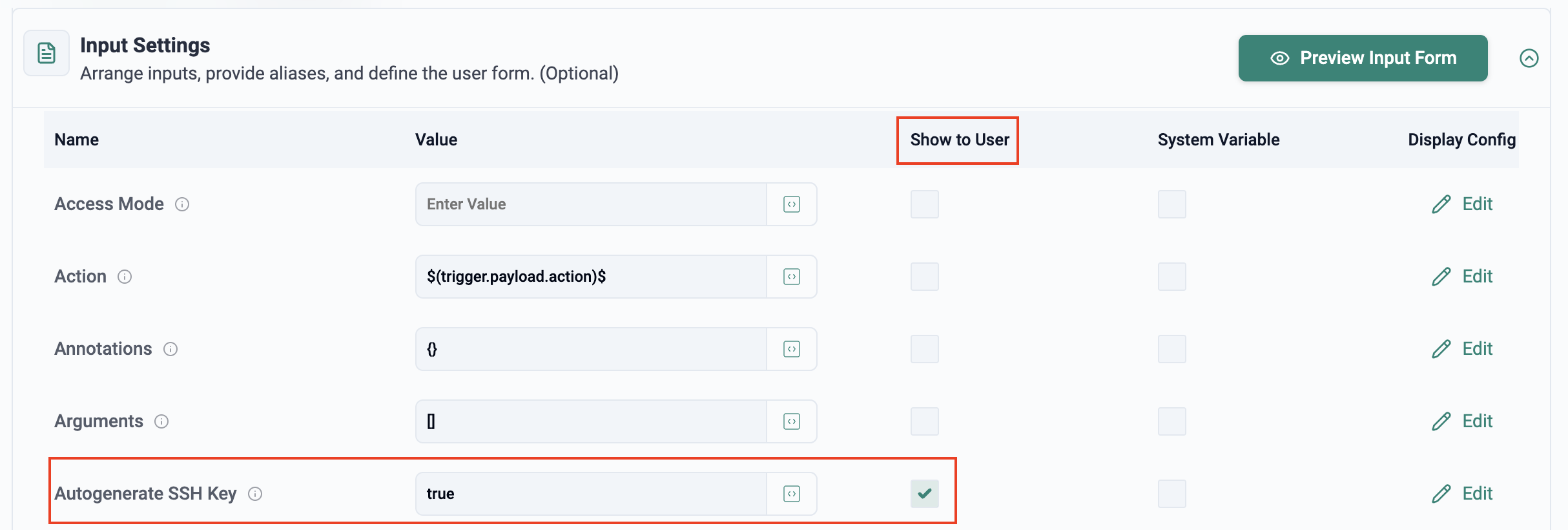
This section defines what inputs are presented to the user, how they are presented, and in what sequence. Examples include dropdowns, text fields, toggles, or other guided controls.
For example, the platform engineer may choose to show the "Autogenerate SSH Key" option to the user, making access simpler while still supporting users who prefer to bring their own public key.
Typical inputs exposed to users include:
Autogenerate SSH Key (Yes/No)
CPU allocation
Memory allocation
GPU model
GPU count
Base image or runtime image (for example, Ubuntu 22.04 with PyTorch)
This is where platform teams strike the right balance between flexibility and guardrails.
Users should be able to choose what they need for the task at hand, but they should not be forced to navigate every low-level infrastructure detail. In practice, this means platform engineers usually:
Curate the list of available GPU models
Limit the range of CPU and memory choices
Publish validated images with the right frameworks, CUDA versions, and dependencies
Provide defaults that align with common use cases
The result is an opinionated workflow that keeps users on the rails while still giving them enough freedom to move quickly. That is exactly what good self-service should do.
Outputs
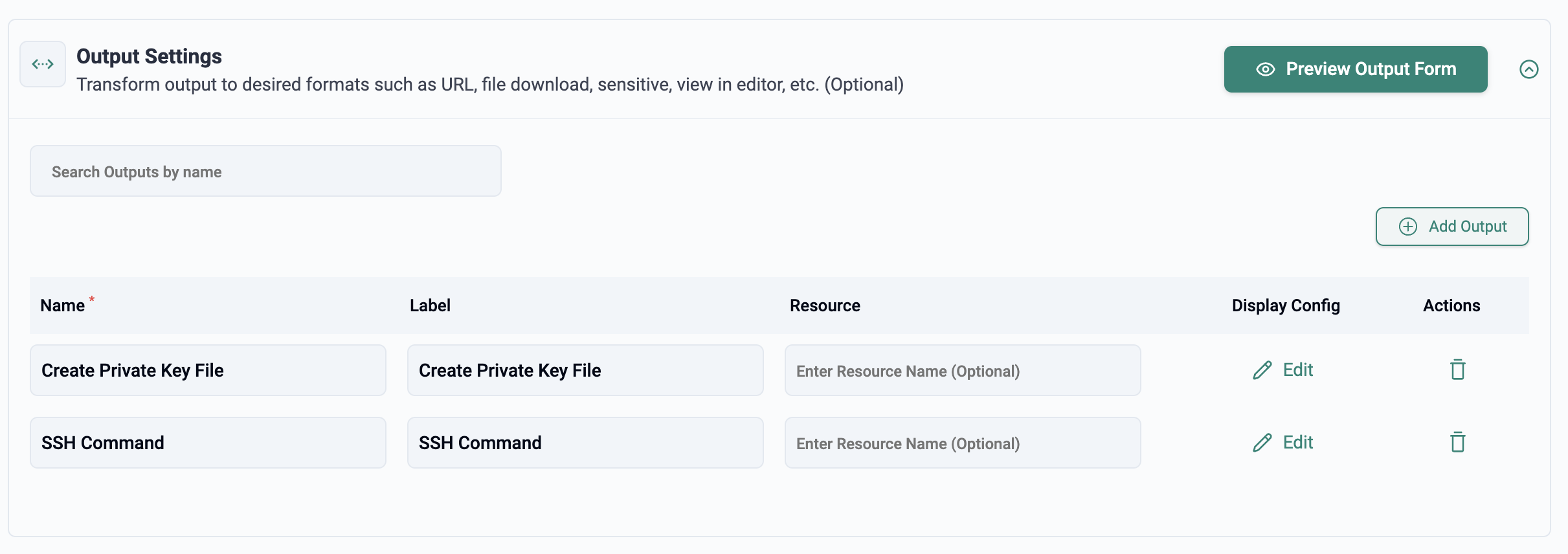
This section determines what is displayed to the user after the Developer Pod has been successfully deployed.
In our example, we want to show the user two fields:
The command to save the SSH private key used to access the Developer Pod
The command to SSH into the Developer Pod
This is a small but critical part of the overall experience.
The moment that matters most for the end user is not when they click Launch. It is the moment immediately after the environment is ready, when they ask:
“How do I get into it and start working?”
Well-designed outputs remove uncertainty and reduce cognitive load. Instead of making the user search through logs, documentation, or platform objects, the SKU can provide direct, prescriptive next steps.
For platform teams, this is also an opportunity to standardize the handoff experience. Every user gets the same guided access pattern, which makes the platform easier to adopt and easier to support.
What Platform Teams Are Really Building
At a technical level, SKU Studio helps define a self-service catalog item. At a platform level, it is doing something more important: it allows teams to package infrastructure into a consumable product.
That product has to satisfy both sides:
For developers and data scientists: it should feel instant, familiar, and frictionless
For platform and operations teams: it should be governed, repeatable, and efficient
This is the key shift behind Developer Pods. The goal is not to teach every user Kubernetes. The goal is to make Kubernetes invisible while still using it to drive efficient scheduling, multi-tenancy, and high-density GPU utilization behind the scenes.
SKU Studio is where that abstraction is designed.
Closing Thoughts
Developer Pods are not just about launching environments faster. They represent a better model for how AI teams should consume expensive compute.
In Part 1, we discussed why the traditional model of tickets, static allocations, and oversized infrastructure is the wrong abstraction.
In Part 2, we looked at the end-user experience: a simple form, familiar SSH-based access, and a running environment in about 30 seconds.
In this post, we looked at the platform engineering side of the equation. With SKU Studio, teams can design that experience deliberately: curate the inputs, publish validated images, define clear outputs, and give users exactly what they need—without exposing the complexity underneath.
That is the real promise of Developer Pods:
instant environments for users, standardized control for platform teams, and more efficient use of GPU infrastructure for the business.
In the next post, we will look at what happens underneath the covers when a Developer Pod is launched and used by an end user.
Developer Pods: A Self-Service GPU Experience That Feels Instant
rom a simple form to a live SSH session in ~30 seconds. This is what self-service GPU access actually looks like with Rafay Developer Pods, no Kubernetes knowledge required.
Instant Developer Pods: Rethinking GPU Access for AI Teams
Rafay Developer Pods eliminate the ticket queues and bloated VMs holding AI teams back — GPU-ready in ~30 seconds, Kubernetes-powered, complexity-free.

.png)