The Model Context Protocol (MCP) is an open standard that enables AI assistants to securely interact with external tools and systems. When used with Kubernetes, MCP allows an AI assistant to execute operations (for example, kubectl commands), retrieve live cluster state, and reason about results without requiring users to manually copy and paste output into a chat interface.
This blog uses Claude Desktop as an example AI assistant. The same approach applies to any MCP-compatible AI client.
For platform administrators, this capability enables controlled, auditable, and policy-driven AI-assisted cluster operations.
Recommended Architecture: Local MCP Server with Rafay ZTKA Kubeconfig
For production environments, the recommended approach is to run the MCP server locally and connect to your Kubernetes cluster using a Rafay Zero Trust Kubectl Access (ZTKA) kubeconfig.
In this model:
The MCP server runs on the administrator’s workstation
Cluster access is established through Rafay’s ZTKA secure relay
No inbound access to the cluster is required
No VPN tunnels or exposed Kubernetes API endpoints are needed
This architecture aligns with zero-trust security principles and enterprise compliance requirements.
Security and Governance Considerations for Platform Admins
When integrating AI-driven access into Kubernetes environments, security, identity, and auditability must remain fully enforced. Rafay ZTKA ensures:
1. Authentication (AuthN) and Authorization (AuthZ)
Access is tied to verified user identity
Authorization is enforced via Rafay RBAC policies
No static tokens or long-lived credentials are required
Permissions are evaluated for every request
The AI assistant does not bypass cluster security controls, it operates strictly within the RBAC boundaries of the authenticated user.
2. Audit Logging
Every kubectl request routed through ZTKA is recorded in the Rafay platform
All actions initiated via the MCP server are fully auditable
Logs can be used for compliance validation, forensics, and operational review
This ensures AI-assisted operations are as traceable as manual administrative actions.
3. RBAC-Controlled Access
Access to clusters, namespaces, and resources is governed by Rafay RBAC
Platform teams can restrict AI-assisted access to specific roles or environments
Fine-grained access control remains intact
4. No Exposed Cluster Endpoints
ZTKA uses a secure relay architecture
Kubernetes API servers do not need to be publicly accessible
No direct inbound network exposure is introduced
Prerequisites
Before enabling MCP-based Kubernetes access, ensure the following components are installed and configured:
mcp-server-kubernetes (installed globally):
npm install -g mcp-server-kubernetes
A ZTKA kubeconfig file downloaded from the Rafay Console
kubectl installed locally
An MCP-compatible AI client (Claude Desktop is used here as an example)
Installing mcp-server-kubernetes globally ensures the executable is available in your system PATH, allowing your AI client to invoke it correctly.
Replace /path/to/ztka-cluster-config.yaml with the actual path to your ZTKA kubeconfig.
Connecting Your AI Client (Example: Claude Desktop)
After configuring the MCP server to use your ZTKA kubeconfig:
Restart your AI client
Confirm that Kubernetes tools appear in the client’s connectors or tool menu
Start a new session and select the Kubernetes integration if prompted
Once connected, the AI assistant can securely execute Kubernetes commands through the MCP server.
Validate the Integration
To verify the setup, try simple test commands such as:
List all pods in all namespaces
Fix the pods or resources which are in error state of crashloop back state
On first use, your AI client will request permission to execute Kubernetes operations. Approve the request to continue.
Watch: Troubleshoot Kubernetes resources with Claude using MCP
Operational Recommendations for Platform Teams
Before rolling out this capability broadly:
Review and validate RBAC permissions
Restrict write access where not required
Pilot the integration in non-production environments
Monitor audit logs during the initial rollout
Establish governance guidelines for AI-assisted operational workflows
Summary
By combining MCP with Rafay ZTKA, organizations can enable AI-driven Kubernetes interactions without compromising security, visibility, or compliance.
This integration provides:
Identity-based access control
RBAC enforcement
Full auditability
A zero-trust network posture
While this guide demonstrates the workflow using Claude as an example AI client, the same architecture applies to any MCP-compatible assistant.
What's Next
We are developing a native Rafay MCP Server that will expose Rafay-specific discovery and action-oriented capabilities through MCP including multi-cluster operations, add-on and blueprint management, and more. Stay tuned for updates.
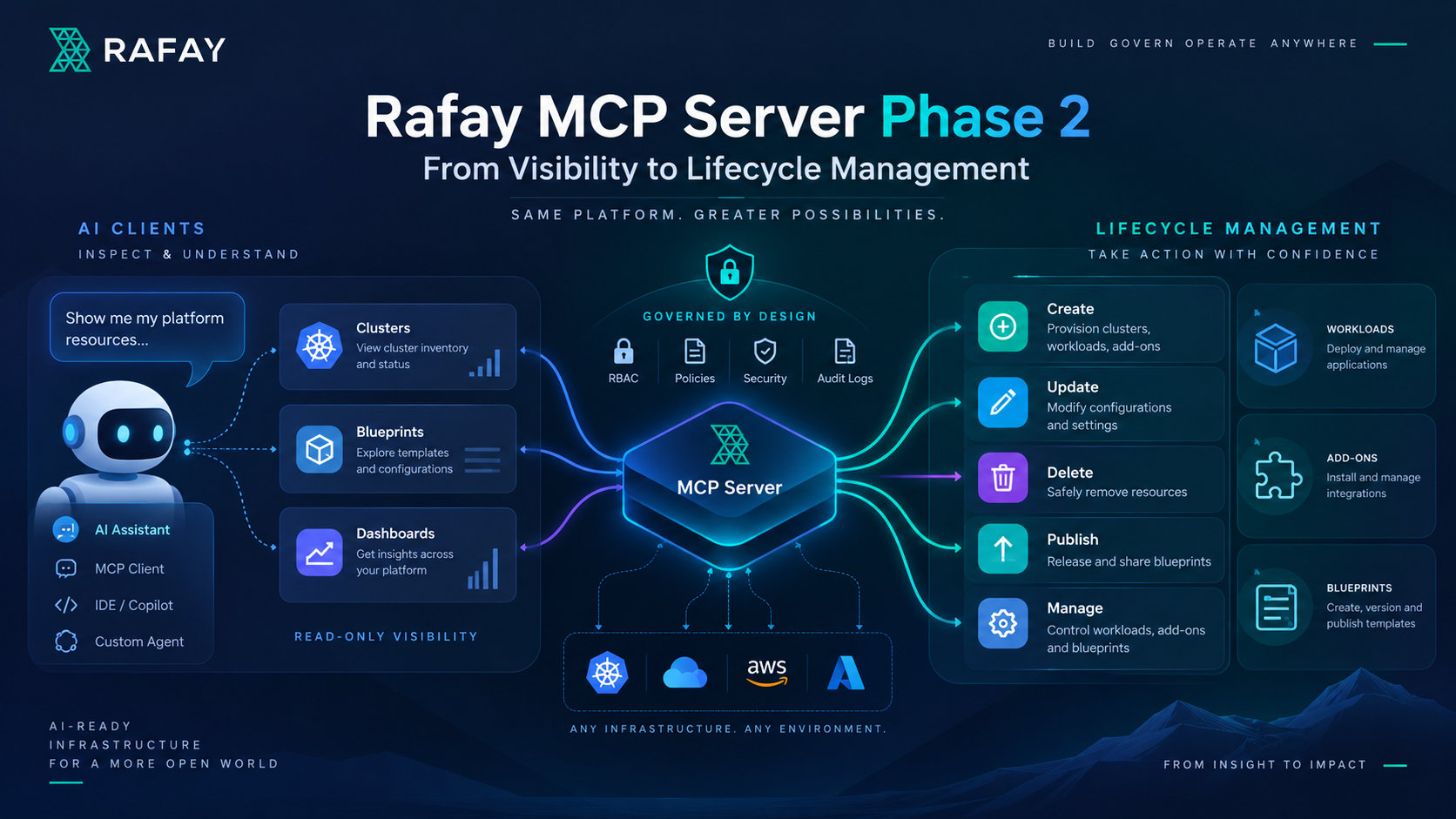
Rafay MCP Server Phase 2: From Visibility to Lifecycle Management
See how Rafay MCP Server Phase 2 expands from read-only visibility to governed lifecycle management, enabling AI clients to create, update, delete, and publish platform resources with RBAC and audit controls.
Bring Rafay Into Your AI Workflows with the Rafay MCP Server
The Rafay MCP Server brings secure, AI-assisted visibility to Kubernetes and platform operations, letting teams use natural language to inspect clusters, workloads, blueprints, and environments through MCP-compatible AI tools.

.png)

.png)