Key takeaways
AI infrastructure teams have more options than ever for running machine learning workloads, but choosing the right orchestration platform isn't always straightforward. Slurm and Kubernetes are both widely used, yet they were designed for very different workloads.
Slurm was built for high-performance computing and excels at scheduling large, tightly coupled batch jobs. Kubernetes was designed for containerized applications and offers the flexibility, scalability, and tooling needed to run production AI applications and services.
For organizations running AI at scale, the choice isn't necessarily about picking one over the other. Training, inference, MLOps, and hybrid infrastructure can place very different demands on an orchestration platform.
In this guide, we'll compare Slurm and Kubernetes across architecture, AI/ML workloads, GPU utilization, scalability, operational complexity, and total cost of ownership. We'll also look at when it makes sense to use both and how a unified management layer can help teams operate AI infrastructure across environments.
Slurm vs. Kubernetes for AI/ML: Choosing the Right Approach
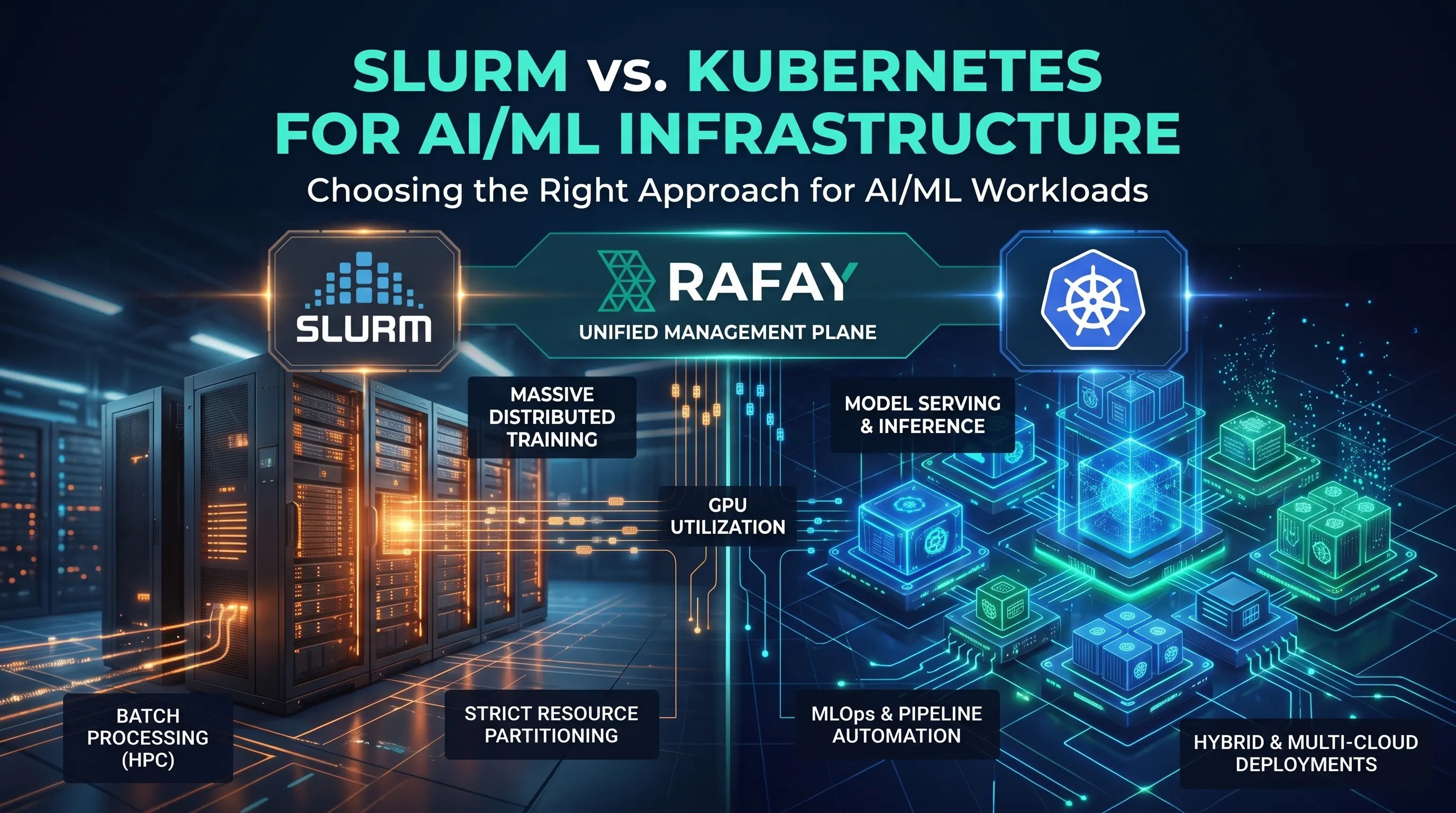
Slurm and Kubernetes are both powerful platforms for AI/ML workloads, but they solve different problems. Slurm is built for high-performance computing and large-scale batch jobs, while Kubernetes is designed for containerized applications, production inference, and cloud-native workflows.
For AI teams, the right choice depends on the workloads you're running. Training, inference, GPU utilization, MLOps, and hybrid infrastructure can all favor different approaches. In some environments, the best answer may be to run both.
Slurm: Built for High-Performance Computing
Slurm (Simple Linux Utility for Resource Management) was built as a workload manager for high-performance computing. It manages a pool of compute nodes, accepts job submissions, places them in priority queues, and dispatches them when resources become available.
Its scheduling model is designed for compute-intensive batch workloads. Gang scheduling can co-schedule the processes of a tightly coupled parallel job, while backfill scheduling uses available capacity for smaller jobs without delaying higher-priority work. Preemption and fair-share policies also help distribute resources across teams.
Kubernetes: Built for Containerized Applications
Kubernetes takes a different approach. It is a container orchestrator designed to manage the lifecycle of distributed, containerized applications. Instead of Slurm's batch jobs and queues, Kubernetes works with objects such as pods, deployments, services, and controllers.
Its scheduler places workloads on nodes based on resource requests, affinity rules, and other constraints. While Kubernetes can support batch and distributed AI workloads, its broader strength is managing dynamic applications and services that need to scale, recover, and update continuously.
How Their Operating Models Differ
The architectural differences become clearer when you look at how each platform manages infrastructure.
- Slurm: Typically operates around a defined pool of compute resources and focuses on efficiently scheduling jobs across that infrastructure.
- Kubernetes: Is designed for dynamic environments where workloads and nodes can scale up or down as requirements change.
- Slurm: Provides specialized scheduling and resource controls for HPC and tightly coupled workloads.
- Kubernetes: Provides portability across environments and a broader ecosystem for deploying and operating applications.
Neither approach is universally better. The right choice depends on the type of AI/ML workloads you're running and how your infrastructure needs to operate.
Comparing AI/ML Capabilities: Training vs. Inference
AI/ML workloads have very different compute requirements depending on whether you're training models or serving them in production. Slurm and Kubernetes are suited to these workloads in different ways.
Training
Large-scale distributed training is where Slurm is particularly well suited. Training jobs may require hundreds of GPUs to work together, with processes starting simultaneously and communicating over high-speed interconnects.
Why Slurm works well for training:
- Gang scheduling: Allocates the resources required for a distributed job at the same time.
- Resource isolation: Helps prevent other workloads from competing for the resources and interconnects a training job's needs.
- MPI integration: Supports tightly coupled distributed workloads commonly used for large-scale model training.
- HPC scheduling: Provides mature scheduling and resource management for large, compute-intensive jobs.
Kubernetes can also run distributed training workloads using tools such as the MPI Operator, Volcano, and Kueue. However, teams may need additional scheduling components and configuration to achieve the same level of specialized batch scheduling and topology-aware placement.
Inference
Inference has a different set of requirements. Production model serving needs to respond to changing traffic, scale resources as demand changes, and deploy new model versions without disrupting users.
Why Kubernetes works well for inference:
- Autoscaling: Scale workloads based on metrics such as resource utilisation, latency, or queue depth.
- Load balancing: Distribute inference requests across available workloads.
- Rolling updates: Deploy new model versions with minimal disruption.
- AI/ML tooling: Platforms such as KServe and Triton Inference Server integrate with Kubernetes for model serving and GPU workloads.
- Cloud-native integration: Connect model serving with APIs, observability, CI/CD, and other application infrastructure.
Slurm can run inference workloads, but it isn't designed around long-running services and application-style autoscaling. Kubernetes therefore tends to be a more natural fit for production model serving.
Training vs. Inference: Which Platform Fits?
The distinction is fairly straightforward:
For organizations running both large-scale training and production AI applications, using Slurm and Kubernetes together can be more practical than forcing every workload onto a single platform.
When Slurm Excels: The Case for Batch Processing and HPC
Slurm remains a strong choice for several specific AI/ML and HPC scenarios.
Massive Distributed Training
If your primary workload is training foundation models or running large-scale simulations across hundreds or thousands of GPUs, Slurm's scheduling capabilities are well suited to the job. Gang scheduling, topology-aware placement, and fair-share policies help teams manage large distributed workloads efficiently.
Strict Resource Partitioning
In multi-tenant research environments, different teams may need guaranteed allocations of shared GPU resources. Slurm's partitions and Quality of Service (QOS) policies provide granular controls for prioritizing jobs and managing resource access across teams.
Existing HPC Infrastructure
Organizations with significant investments in bare-metal GPU clusters, InfiniBand fabrics, and parallel file systems such as Lustre or GPFS may already have infrastructure built around Slurm. In these environments, introducing Kubernetes can add operational complexity without providing enough additional value for training workloads to justify the change.
Predictable Job Scheduling
Slurm provides configurable preemption and scheduling policies, giving teams control over which jobs can be interrupted and how resources are allocated. This predictability can be particularly valuable for long-running training jobs where interruptions can be costly.
Where Slurm Falls Short
Slurm is focused primarily on scheduling and managing compute workloads. Teams may need additional tools for tasks such as:
- Training data and experiment tracking
- Model deployment
- CI/CD for ML workflows
- Production model serving
- End-to-end MLOps
Kubernetes has a broader ecosystem for these application and deployment workflows, which can make it a better fit when AI workloads extend beyond the training environment.
When Kubernetes Is the Better Fit for AI/ML
Kubernetes becomes a stronger fit when AI workloads extend beyond compute scheduling into application deployment, model serving, and operational workflows.
Model Serving and Inference at Scale
Kubernetes is well suited to production model serving, where workloads need to respond to changing traffic and remain available during updates.
Key capabilities include:
- Autoscaling: Adjust resources as inference demand changes.
- Load balancing: Distribute requests across model-serving workloads.
- Health checks: Detect unhealthy workloads and replace them automatically.
- Rolling updates: Deploy new model versions with minimal disruption.
- API integration: Connect model-serving workloads with gateways and other application services.
MLOps and Pipeline Automation
Kubernetes supports a broad ecosystem of tools for building and automating ML workflows.
Platforms and tools such as Kubeflow Pipelines and Argo Workflows can support processes including:
- Data preprocessing
- Model training
- Evaluation
- Deployment
- Workflow automation
These workflows can also integrate with version control, container registries, and observability platforms to support more reproducible ML operations.
Hybrid and Multi-Cloud Deployments
Kubernetes is available across major cloud providers and on-premises environments, making it useful for organizations operating AI infrastructure across multiple locations.
This can support use cases such as:
- Bursting workloads to cloud GPU capacity when on-premises resources are constrained
- Serving models closer to users or data
- Running workloads across different cloud environments
- Maintaining consistent deployment patterns across environments
Slurm can also be deployed across distributed infrastructure, but Kubernetes is generally better suited to managing application workloads across heterogeneous environments.
Developer Velocity
Kubernetes can bring AI/ML workloads closer to the development and deployment practices used by the wider engineering organization.
Data scientists and ML engineers can work with familiar tools and workflows for:
- CI/CD
- Containerized deployments
- Monitoring and observability
- Service management
- Production releases
This can reduce the gap between developing a model and deploying it as a production service.
GPU Sharing and Fractional Allocation
Kubernetes supports GPU sharing through device plugins and technologies such as NVIDIA Multi-Instance GPU (MIG) and GPU time-slicing. This can be useful for inference, development, and other workloads that don't require an entire GPU.
The Trade-Off: Flexibility Adds Complexity
Kubernetes provides a broader platform for AI workloads, but operating it effectively requires additional expertise. Teams may need to manage:
- GPU operators and device plugins
- Batch and custom scheduling
- Storage provisioning
- Networking
- Autoscaling
- Observability
For organizations without existing Kubernetes expertise, this operational overhead should be included when evaluating the platform's overall cost and complexity.
Bridging Slurm and Kubernetes
For many organizations, Slurm and Kubernetes don't have to be an either-or decision. Running both can make sense when different workloads have different infrastructure requirements.
There are several ways to combine the two platforms, depending on how closely you want them to work together.
Running Slurm on Kubernetes
Tools such as SOperator and Sunk allow Slurm clusters to run as Kubernetes workloads. The Slurm controller and compute daemons run in containers managed by Kubernetes, while users can continue working with the familiar Slurm interface.
This approach can centralize infrastructure management on Kubernetes while retaining Slurm's scheduling capabilities for HPC and large-scale training workloads.
Using Kubernetes as a Compute Backend for Slurm
Here, Slurm remains the main scheduler that users interact with, while Kubernetes provides additional compute capacity when needed. For example, teams can use cloud-based Kubernetes infrastructure when their on-premises resources reach capacity.
This gives Slurm users access to additional capacity without requiring them to change their existing workflows.
Running Separate Clusters with Shared Storage
The simplest approach is often to keep the platforms separate. Slurm can handle model training while Kubernetes manages inference and MLOps, with both environments accessing shared data and model artifacts.
Shared storage can include NFS, S3, or parallel file systems. The platforms don't need to be deeply integrated, but teams need a reliable way to manage data, model artifacts, and workflows between them.
Managing Both Through a Unified Platform
A more integrated approach is to use a management layer that can provision and manage both Slurm and Kubernetes environments.
This can give platform teams a central view of infrastructure and GPU resources while allowing workloads to run on the scheduler best suited to them.
Choosing the Right Integration Approach
Each approach comes with trade-offs. Running Slurm on Kubernetes adds another layer between users and the underlying infrastructure, while keeping separate environments means managing the boundary between them.
The right approach depends on your existing infrastructure, the workloads you're running, and how much integration your teams actually need. In many cases, keeping Slurm for specialized training workloads and Kubernetes for inference and MLOps provides a practical balance.
Analyzing the True Cost: TCO and Operational Overhead
The cost of Slurm and Kubernetes goes beyond the software itself. Hardware, infrastructure, engineering time, and operational overhead can all have a significant impact on total cost of ownership (TCO).
Slurm is relatively lightweight to operate, but organizations running HPC environments still need to account for GPU servers, high-speed networking, storage, power, cooling, and infrastructure management.
Kubernetes is also open source, but its broader ecosystem can add operational complexity. Teams may need to manage components such as networking, storage, ingress, GPU support, monitoring, and upgrades, as well as the expertise required to run them effectively.
For AI workloads specifically, several Kubernetes cost factors are easy to overlook:
GPU Scheduling and Placement
Kubernetes supports GPUs through device plugins and provides topology-aware resource management, but large distributed training workloads can require additional configuration to optimize placement across GPUs, NUMA nodes, and network topology. Tools such as Kueue can add capabilities for batch queueing, resource management, and topology-aware scheduling.
Multi-Tenancy Complexity
Building a multi-tenant GPU platform requires more than simply allocating GPUs to different teams. Organizations may need resource quotas, priorities, access controls, network policies, and observability to manage shared infrastructure effectively. Kubernetes and tools such as Kueue provide mechanisms for quotas, fair sharing, and workload admission, but configuring and operating them still adds complexity.
Cloud GPU Costs
For cloud-based AI workloads, GPU compute can be the largest component of infrastructure spend. The overall cost also depends on factors such as instance type, storage, networking, data transfer, and how effectively workloads scale up and down.
GPU Underutilization
Idle GPU capacity can quickly become an expensive source of waste, particularly for large training clusters. Slurm's scheduling and backfill capabilities can help keep shared resources occupied, while Kubernetes environments may require careful configuration of scheduling, queueing, autoscaling, and workload placement.
The important point is that GPU utilization can have a greater impact on AI infrastructure costs than the choice of orchestrator alone. Teams should therefore evaluate how effectively each platform can keep expensive GPU capacity productive while still meeting workload and scheduling requirements.
Simplifying Complexity with a Unified Management Plane
Kubernetes gives AI teams flexibility, but operating it across complex GPU environments can add significant overhead. A management layer can help platform teams standardize how clusters and AI workloads are managed across environments.
Rafay Provides a Unified Management Layer
Rafay provides a management plane for operating Kubernetes across on-premises, cloud, and edge environments. This can give platform teams a central way to manage clusters and apply consistent operational practices across distributed GPU infrastructure.
Infrastructure Orchestration Across Environments
Rafay can manage Kubernetes clusters across on-premises infrastructure, public clouds, and edge locations from a central platform. This can reduce the need for separate management processes across different environments.
Self-Service with Governance
Platform teams can provide self-service workflows for developers and data scientists while maintaining central controls. These can include resource quotas, approved GPU types, cost controls, and security policies, allowing teams to access infrastructure without requiring cluster-admin privileges.
AI Workflow Automation
Rafay can automate aspects of AI workload provisioning and lifecycle management, including configuring GPU environments and deploying inference workloads with scaling policies. This helps reduce manual steps between preparing an environment and running an AI workload.
Multi-Tenant GPU Management
Shared GPU infrastructure requires visibility and controls across teams. Rafay supports multi-tenant Kubernetes environments with capabilities such as resource management and chargeback or showback, helping organizations track resource consumption across teams.
Security and Compliance
Rafay can apply consistent Kubernetes security controls across managed environments, including RBAC, network policies, image security, and audit logging. Centralized policies can reduce the need to configure these controls independently for every cluster.
Managing Hybrid Slurm and Kubernetes Environments
Organizations that use Slurm for some workloads and Kubernetes for others can manage the Kubernetes side through Rafay while continuing to use Slurm for workloads that benefit from its HPC scheduling capabilities.
Choosing the Right AI Infrastructure
There isn't a single best orchestrator for every AI workload. The right choice depends on your training, inference, infrastructure, and operational requirements.
Choose Slurm for HPC and Large-Scale Training
Slurm is a strong fit when large-scale distributed training is the primary workload, particularly on dedicated bare-metal GPU infrastructure.
It can make sense to stay with Slurm when:
- Training is the primary AI workload
- Researchers already have established Slurm workflows
- The infrastructure is built around HPC technologies
- Specialized batch scheduling is a priority
Choose Kubernetes for Production AI
Kubernetes is a better fit when AI workloads extend into production application delivery and MLOps.
Consider Kubernetes when you need:
- Production model serving and inference
- MLOps and CI/CD workflows
- Hybrid or multi-cloud deployments
- Self-service access to AI infrastructure
- Integration with existing cloud-native applications and tooling
Use Slurm and Kubernetes Together
For organizations with both HPC training and production AI requirements, running both platforms can provide a practical balance. Slurm can handle large-scale training while Kubernetes manages inference, MLOps, and application workloads.
Shared storage, model registries, and consistent operational processes can help connect the two environments.
The Operational Layer Matters
The scheduler is only one part of an AI infrastructure strategy. As environments grow, teams also need consistent governance, self-service, security, lifecycle management, and cost visibility across their infrastructure.
Kubernetes is also gaining stronger support for batch and AI workloads through projects such as Kueue, while Slurm remains widely used for HPC scheduling. Rather than assuming one platform will replace the other, organizations should evaluate how each fits their current workloads and infrastructure strategy.
Manage AI Infrastructure with Rafay
Whether you're running Kubernetes across cloud and on-premises environments or operating a hybrid Slurm and Kubernetes infrastructure, Rafay provides a management layer for standardizing operations across clusters.

Ready to simplify AI infrastructure management?
Explore how Rafay can help your platform team manage Kubernetes at scale, provide self-service GPU access, and apply consistent governance across environments.
Contact Us Today
Frequently Asked Questions
Can Slurm and Kubernetes run in the same AI environment?
Yes. Organizations can use Slurm and Kubernetes side by side when different workloads have different requirements. Slurm can support HPC-oriented training, while Kubernetes can handle model serving, MLOps, and other cloud-native workloads. A management platform such as Rafay can help platform teams manage the Kubernetes environments alongside existing infrastructure.
How should organizations manage GPU infrastructure across multiple environments?
Managing GPUs across on-premises infrastructure, public clouds, and multiple clusters can become difficult as environments grow. Teams need consistent policies for resource allocation, access, security, and cost visibility. Rafay provides a central management layer for Kubernetes environments, helping platform teams standardize operations across distributed infrastructure.
Does Rafay support hybrid Slurm and Kubernetes environments?
Rafay can manage the Kubernetes side of a hybrid environment while organizations continue using Slurm for workloads that benefit from HPC-oriented scheduling. This allows teams to maintain existing Slurm workflows while using Kubernetes for inference, MLOps, and other application workloads.
What does Rafay add to managed Kubernetes for AI?
Rafay provides an operational management layer above individual Kubernetes clusters. It can help platform teams centralize cluster lifecycle management, governance, self-service workflows, security policies, and resource management across environments rather than managing each cluster separately.
How can teams give data scientists self-service access to GPUs?
A self-service platform can allow data scientists to request and deploy workloads without requiring direct cluster-admin access. Platform teams can define guardrails around GPU types, resource quotas, access controls, and other policies. Rafay supports this model by providing self-service workflows while keeping governance with the platform team.
Is Kubernetes a replacement for Slurm?
Not necessarily. Kubernetes has expanded its support for batch and AI workloads, but Slurm remains well suited to specialized HPC scheduling and large-scale distributed training. For organizations with both HPC and production AI requirements, using the two platforms for different workloads may be more practical than replacing one with the other.
What should organizations consider when choosing an AI orchestration platform?
The most important considerations depend on the workloads and infrastructure involved. Evaluate distributed training requirements, model serving, GPU utilization, existing HPC investments, cloud and hybrid environments, MLOps needs, operational expertise, and the level of governance and self-service your teams require.